
Steering the Vibe: Orchestration
Earlier this year I spoke to the idea of Agent Orchestration where changes to software span multiple context windows, and work needs to be split and passed to agents while monitoring progress deterministically. There are a number of approaches to solving this problem but the majority are purely agent based.
The most basic solution is prompting the agent to help you build a /plan, persisting this markdown somewhere (potentially in source), and tracking where in the plan you’re up to via either commits or edits to the plan. The basic approach can be extended further with skills and commands that include better prompting and guidance on how the plan should be created and tracked. Solutions like nWave, Structured-Prompt-Driven Development, and Gemini Conductor (Claude port) extend your agentic workflow so these approaches can be directly called within the agent UI.
Other posts in this series
- Steering the Vibe: Commits
- Steering the Vibe: Verify
- Steering the Vibe: Refactor
- Steering the Vibe: Review
- Steering the Vibe: Complexity
- Steering the Vibe: Permissions
- Steering the Vibe: Orchestration (this post)
- Steering the Vibe: Worktrees
At the time of writing, my goto for code-assist is Claude Code and Opus 4.7, so I'll use terminology that relates to these tools, but the concepts within potentially apply to all.
Deterministic Workflows
Having the agent manage the workflow itself remains suboptimal. Sub-agent management is expensive (tokens) and buggy (permissions), and sub-agent processes have UI access limitations. Context window management outside of compaction is entirely absent and as context windows fill up, quality drops. Agents controlling their own work are often lazy and will defer work or mark it completed when it is not. Finally, there are still some manual checks required while workflow loops are being optimized and hoping that non-deterministic agents will enforce these is not reliable.
Instead, let’s orchestrate the non-deterministic agents in a deterministic way. Where assist started as a way for agents to call deterministic actions, it can now deterministically call agents itself. assist backlog --help supplies agents with the means to create and modify backlog items. assist draft and assist bug spawn Claude Code prompted with guidance on building backlog items with the user, and /next within Claude Code or assist next outside spawns Claude Code and prompts it through multiple phases of backlog item delivery.
This functionality enables the agent to execute deterministic actions via assist, and for assist to spawn and control the agent. The result is a workflow that looks like a series of nested loops, where control is passed up and down the loops as their responsibilities are completed.
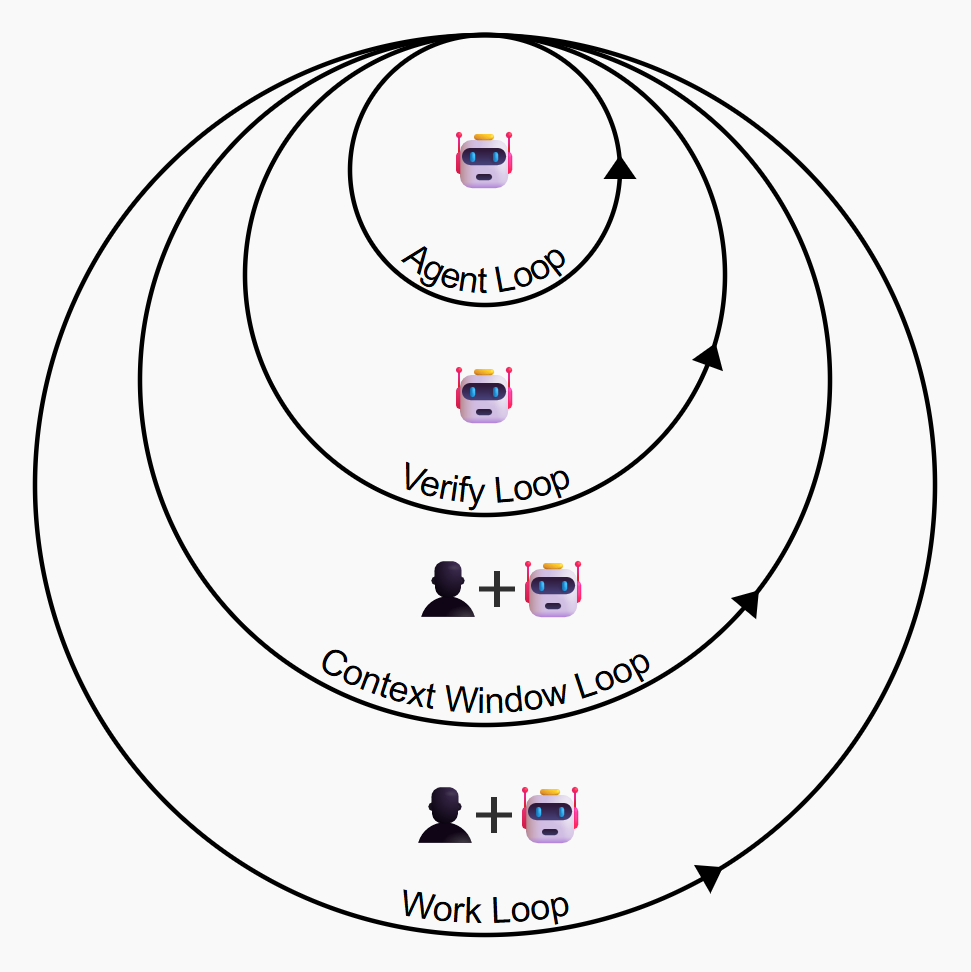
Agent Loop
Likely you’re already familiar with the most central loop, as it’s the agent itself, how you interact with it when it makes a single change, and how it ends up making that change. In this case, the Agent Loop is Claude Code. You ask it to make a change, and it uses a bunch of tool calls to make that change until it feels it’s done so. Tool calls might involve reading code, editing code, running code etc. This is the agentic workflow that changed software development forever in 2025.
%%{init: {'theme': 'neutral', 'themeVariables': {'fontSize': '24px'}}}%%
graph TB
    prompt["Prompt"] --> AL

    subgraph AL["Agent Loop"]
        direction LR
        read["Read"] --> edit["Edit"] --> run["Run"]
        run --> read
    end

    style AL stroke-width:2px
Verify Loop
The second loop is triggered whenever the Agent Loop is completed, and represents the automated, deterministic checks that we run to enforce our quality expectations on the code generated by the Agent Loop. This loop is a natural extension to the Agent Loop and significantly improves quality. I use assist verify to implement this loop and I discuss the approach in this blog post. The types of checks executed in this loop might include:
- Compilation and linting
- Test runs and complexity analysis
- Duplicate and dead code detection
- Code and log analysis
%%{init: {'theme': 'neutral', 'themeVariables': {'fontSize': '24px'}}}%%
graph TB
    subgraph VL["Verify Loop"]
        direction TB

        subgraph AL["Agent Loop"]
            direction LR
        end

        lint{"Lint check"}
        typecheck{"Type check"}
        dupecheck{"Dupe check"}
        AL --> lint
        AL --> typecheck
        AL --> dupecheck
        lint -->|fail| AL
        typecheck -->|fail| AL
        dupecheck -->|fail| AL
    end

    style VL stroke-width:2px
    style AL stroke-width:2px
Context Window Loop
Where the Verify Loop consists entirely of deterministic tasks, the Context Window Loop consists entirely of non-deterministic tasks. These tasks each use a separate context window to achieve their goal. These might be considered sub-tasks on a backlog item and can represent the vertically sliced code changes we need to make to achieve a backlog item’s acceptance criteria. They might also represent agent-led or human-led analysis of the passing or failing state of acceptance criteria. The number of context windows we need to deliver any given backlog item will be dependent on how we refine backlog items, what our non-deterministic quality expectations are, and perhaps what we expect from a Definition of Done.
Looping at the context window level with prompts that are specific to implementing or reviewing an incremental implementation results in reduced opportunity for context windows to reach their limit, reduced time and cost of context compaction, and smaller, focused, higher-quality changes. Looping here also leads to experimentation with agent personas, LLM-as-a-judge, and passing the work outside of your local, for example in the case of agent-led pull request reviews.
%%{init: {'theme': 'neutral', 'themeVariables': {'fontSize': '24px'}}}%%
graph TB
    subgraph CWL["Context Window Loop"]
        direction TB

        subgraph VL["Verify Loop"]
            direction LR
            subgraph AL["Agent Loop"]
                direction LR
            end
        end

        impl{"Implementation"}
        agentreview{"Agent review"}
        manualchecks{"Manual checks"}
        impl --> AL
        agentreview -->|fail| AL
        manualchecks -->|fail| AL
    end

    style CWL stroke-width:2px
    style VL stroke-width:2px
    style AL stroke-width:2px
Work Loop
When the other loops are optimised, the bottleneck becomes defining and refining this work, and so the Work Loop becomes the key area where user involvement is still required. It’s the list of changes that either needs to be prioritized and passed through the other loops, or, the refinement that needs to be done to determine what this list of changes is. assist draft (alias assist feature) and assist bug spawn Claude Code with the intention of adding features or bugs to the assist backlog list. Items that require further refinement can be triggered via either assist refine or /refine.
Whenever assist is called in those ways from the terminal, it will spawn Claude Code with a relevant prompt that will cause the agent to step through questions to further refine the backlog item being created. Because assist is spawning Claude Code itself, it can detect user commands like /next or agent invocations of assist backlog done, terminate the child process, and then spawn another Claude Code with a new prompt for the next Context Window loop.
%%{init: {'theme': 'neutral', 'themeVariables': {'fontSize': '24px'}}}%%
graph TB
    subgraph WL["Work Loop"]
        direction TB

        subgraph CWL["Context Window Loop"]
            direction LR
            subgraph AVL["Agent + Verify Loops"]
                direction LR
            end
        end

        addrefine{"Add & refine items"}
        progress{"Progress & complete items"}
        pick{"Choose next item"}
        addrefine --> CWL
        progress --> CWL
        pick --> CWL
    end

    style WL stroke-width:2px
    style CWL stroke-width:2px
    style AVL stroke-width:2px
Full Workflow
The diagrams in this post are simplified for clarity - each loop might have many different tasks executing within it, and which tasks matter will depend on the application or system being built and the change being applied. Attempting to manually manage this orchestration quickly becomes overwhelming and limits parallel work, while expecting the agent to manage it is unreliable and leads to lower quality. Using assist to orchestrate the loops gives us a reliable workflow that leads to higher-quality code and more efficient development.
%%{init: {'theme': 'neutral', 'themeVariables': {'fontSize': '24px'}}}%%
graph TB
    subgraph WL["Work Loop"]
        direction TB

        subgraph CWL["Context Window Loop"]
            direction TB

            subgraph VL["Verify Loop"]
                direction TB

                subgraph AL["Agent Loop"]
                    direction LR
                    read["Read"] --> edit["Edit"] --> run["Run"]
                    run --> read
                end

                lint{"Lint check"}
                typecheck{"Type check"}
                dupecheck{"Dupe check"}
                lint -->|fail| AL
                typecheck -->|fail| AL
                dupecheck -->|fail| AL
            end

            impl{"Implementation"}
            agentreview{"Agent review"}
            manualchecks{"Manual checks"}
            impl --> VL
            agentreview -->|fail| VL
            manualchecks -->|fail| VL
        end

        addrefine{"Add & refine items"}
        progress{"Progress & complete items"}
        pick{"Choose next item"}
        addrefine --> CWL
        progress --> CWL
        pick --> CWL
    end

    style WL stroke-width:2px
    style CWL stroke-width:2px
    style VL stroke-width:2px
    style AL stroke-width:2px