
blog
The software that produces this blog · visit blog · devlog
-
v4.15 - Blocking absolute self-links
I kept accidentally writing absolute links back to my own site, which is fragile and breaks local preview. So I added a
remark-no-self-linksplugin that fails the build when content links to a production host (staffordwilliams.com) or to a local dev server route that belongs to the site, pointing me at the root-relative path orpost:/link:shorthand I should have used instead. Drafts are exempt so works-in-progress aren’t blocked. One wrinkle: Astro’s glob loader swallows errors thrown during Markdown render, so during a build the plugin callsprocess.exit(1)to guarantee a non-zero status, while in dev it throws so the error overlay surfaces it. I also swept the existing content to fix the absolute links that were already lurking.While I was in the link plumbing I fixed
remark-post-linksto tolerate a trailing slash onpost:andlink:references, sopost:some-slug/resolves the same aspost:some-sluginstead of failing to find the target. -
v4.14 - Per-post model in the series panel
The series footer used to hardcode which model I was using for code assist, which went stale the moment a new one shipped. I added an optional
modelfield to the posts schema and taught theremark-seriesplugin to substitute a{{model}}placeholder in the footer template with each post’s own value. Now the panel reads “at the time of writing” and names whatever model that particular post was written with.To keep the data honest, the plugin throws at build time if a series footer references
{{model}}but a post in that series is missing the frontmatter, so I can’t accidentally ship a post without recording which model drove it. -
v4.13 - Mermaid diagrams and a Netlify postinstall
I added Mermaid diagram support so posts can embed flowcharts and diagrams directly in Markdown. This meant pulling in the
astro-mermaidintegration alongsidemermaiditself and registering it inastro.config.mjswith theneutraltheme.I also added a
postinstallhook that installsnetlify-cliglobally if it isn’t already on the path, so a freshnpm installleaves me with everything needed to deploy without a separate manual step. -
v4.12 - Devlog cards and project links
I gave devlog tag pages their own social card images.
site.jsonnow emits an entry for each distinct first tag across the devlog, marked with adevlog-tagtype, and the image generation script picks those up to render a card per tag intodist/assets/cards/devlog. The tag page layout points itscardat the matching namespaced image.I also wired devlog links into project info.
ProjectInfochecks whether any devlog entry’s first tag matches the project, and if so adds adevloglink pointing at that tag’s page, so each project can surface its build history right alongside its source and play links. -
v4.11 - A root feed and trimmed excerpts
I added a site-wide
feed.xmlat the root, alongside the existing blog feed. It pulls the ten most recent posts, sorts them by date, and renders a standard RSS 2.0 document with categories drawn from each post’s tags.I also stopped shoving entire post bodies into the feed descriptions. A new
getExcerpthelper now looks for a<!--more-->marker and uses everything before it, falling back to the first paragraph when there’s no marker. The text runs through a smallstripMarkdownpass that flattens links, strips HTML tags, and removes Markdown punctuation so the excerpts read cleanly in a reader. The existing blog feed picked up the same treatment. -
v4.10 - LinkedIn links on posts
Added LinkedIn link support to blog posts. A new optional
linkedinfrontmatter field in the posts content schema links through to the corresponding LinkedIn post. ThePostLayoutrenders a LinkedIn icon next to the post metadata when present. Backfilled LinkedIn URLs across all existing posts that have corresponding LinkedIn shares. -
v4.9 - Shiki syntax highlighting and warning blocks
Replaced highlight.js with Astro’s built-in Shiki integration for syntax highlighting. This removes the external CDN dependency and gives better highlighting out of the box. Reworked the code block styling to use Shiki’s
astro-codeclasses, including the copy badge and responsive margins.Added a new
remark-warning-blockplugin that converts:::warningdirectives into styled callout blocks, and used it to add deprecation warnings to the refactoring post in the Steering the Vibe series. -
v4.8.1 - Series directive fix
Fixed the
remark-seriesplugin to properly handle AST nodes fromremark-directive. Instead of regex-matching raw:::series[name]text in paragraphs, the plugin now looks forcontainerDirectivenodes and extracts the series name from the directive label. Also fixed an issue where content following the series directive was being swallowed — the plugin now preserves those children by splicing them back into the parent after the generated HTML. -
v4.8 - Secure Base64 parody tool
Added secure-base64.
-
v4.7 - Header anchor links on posts
Added anchor links to headings in blog posts using
rehype-slugandrehype-autolink-headings. Each heading now gets a slug-based ID and an appended link icon, making it easy to share direct links to specific sections of a post. -
v4.6 - Remark plugin refactor and AI content prompt toggle
Refactored the remark plugin system significantly. Split the monolithic
remark-jekyll-includes.tsinto focused single-purpose plugins:remark-image-figure.tsfor image-to-figure conversion,remark-info-block.tsfor info callouts, andremark-directive-cleanup.tsfor cleaning up unprocessed directives. This made each plugin easier to reason about and test independently.Reworked
remark-ai-content.tsto add a prompt toggle — AI content blocks now include a clickable element to show or hide the original prompt used to generate the content. Also added a plugins README documenting how each remark plugin works and where it’s used.Fixed a Sass
darken()deprecation warning and started drafting a software quality dimensions post. -
v4.5 - AI content blocks, drafts collection, and link submission
Added a
:::aicontent block syntax via a new remark plugin (remark-ai-content.ts). This lets me annotate AI-generated sections within posts with the model name, rendering them with dual badges to clearly distinguish AI-written content from my own.Moved drafts from the root
_drafts/directory into an Astro content collection atsrc/content/_drafts/. Created a dev-only drafts index and slug page so I can preview draft posts during local development without them appearing in production builds. Added a drafts link to the site header for easy access.Extracted an
AutoResizeIframecomponent to replace the duplicated iframe resizing logic in the bookmarklet-builder and bubble-bobble pages. Also added a new link submission page for authenticated users, proxying the submit function through Netlify, and switched the local dev workflow to usenetlify devfor function support. -
v4.4 - Slippery Boxes fullscreen mode and devlog backfill
Added a fullscreen mode to the slippery-boxes game page. A toggle button in the header expands the iframe to fill the viewport while maintaining the game’s aspect ratio, hiding the site chrome and dynamically resizing on window changes. The fullscreen state is reflected in the URL via a
fullscreenquery parameter so it can be linked to directly. Also added alocalparam for pointing the iframe at a local dev server.Migrated slippery-boxes to use its new subdomain, cleaned up URL parameter handling, and hid scrollbars in fullscreen mode. Updated the page description and added a screenshot of Ralph.
Backfilled devlog entries for the original slippery-boxes development period covering the initial prototype through gamepad support.
-
v4.3 - Project info and link syntax
Added a project info system for devlog entries. Each devlog tag can now have associated metadata defined in
src/data/projects.tsincluding a description, source repo, live URL, and additional links. A newProjectInfocomponent displays this information on devlog pages, replacing the hardcoded spacetraders links that were there before.Extended the remark-post-links plugin to support a
link:prefix for external markdown links. This allows posts to reference external URLs with a shorthand syntax like[text](link:slug)where the slug maps to a predefined URL.Also added post filtering to the blog index and backfilled many devlog entries for the spacetraders-v1 and bags projects.
-
v4.2 - Blog post series navigation
Added a
:::seriesremark plugin that allows blog posts to declare they belong to a series. When a post includes:::series[series-name], the plugin generates navigation showing all posts in the series with links to the others and “(this post)” for the current one.Series are defined in
src/data/series.tswith a title, ordered list of post slugs, and an optional footer HTML file for common content. Updated the “Steering the Vibe” posts to use this new directive instead of manually including the info box in each post. -
v4.1 - Link syntax with validation
Added a custom remark plugin that introduces a
post:link syntax for referencing other posts. Instead of writing full URLs like/blog/2025/12/07/steering-the-vibe-commits/, I can now write[link text](post:steering-the-vibe-commits)and the plugin resolves it to the correct URL based on the post’s date. It also supports anchor links likepost:slug#section.The plugin validates links at build time and throws a helpful error if a referenced post doesn’t exist, listing some available slugs to help track down typos. Went through all existing posts to convert hardcoded internal links to the new syntax.
Also added a VS Code launch configuration for the dev server.
-
v4.0 - Astro migration complete
Finished the Astro migration by removing Jekyll entirely from the project.
Moved all assets from the root
assets/directory topublic/assets/where Astro expects static files. Fixed several styling issues that were lingering from the conversion: inline code now has proper styling, the clearfix for floated images in posts works correctly, and the devlog aggregate page layout was cleaned up. Also improved the devlog toggle button styling.Did some general cleanup - extracted a helper function for devlog URLs, removed unused layout frontmatter fields, and dropped netlify-cli from the dependencies because it breaks github runners (i’ll call it via
npx). Regenerated the package-lock file to clean up dependency changes. -
v4.0.0-alpha.3 - Jekyll migration features
Built a remark plugin to handle Jekyll include tags during the Astro migration. Started in JavaScript then converted it to TypeScript for better type safety. The plugin transforms Jekyll-style includes into their Astro equivalents during markdown processing.
Replaced all the Jekyll post_url liquid tags with actual URLs across a dozen posts. This was necessary since Astro doesn’t have an equivalent to Jekyll’s post linking system.
Added several missing pages to reach feature parity with the old site: card-game, bubble-bobble, bookmarklet builder, and a proper categories page for the blog. Also created tag-based RSS feeds for the devlog so each project can have its own feed.
Implemented Open Graph card support across all the main pages for better social media previews. Various content fixes for code blocks and formatting issues that came through from the Jekyll conversion.
-
v4.0.0-alpha.2 - Astro polish
Polished up the Astro migration with a bunch of fixes and new features.
Added RSS feeds for both the blog and devlog sections. Created several new pages that were missing from the migration: the bookmarklet builder, bubble bobble, slippery boxes, spacetraders, talks, and privacy policy pages.
Fixed up the share buttons component and improved the link card styling. Updated the layout to handle social images better. Various content fixes across devlogs, links, notes, and posts - mostly correcting formatting issues that came through from the Jekyll conversion.
Expanded the migration verification script to catch more edge cases and added a verify ignore list for known acceptable differences.
-
v4.0.0-alpha.1 - Astro conversion
I migrated my blog from Jekyll to Astro. This has been a long time coming - Jekyll served me well for years but I’ve increasingly found myself fighting against it rather than working with it.
The migration involved converting all my HTML blog posts to markdown, setting up the Astro content collections for devlogs and links, and rebuilding the pages (apps, links, 404, etc). I also created a migration verification script to ensure nothing was lost in translation.
The existing devlog entries from the Jekyll version were migrated across as part of this work. The new Astro setup uses a cleaner content structure and should make future updates much easier to manage.
-
v3.3 - Jekyll 4 Upgrade
Upgraded the Jekyll part of the site from version 3 to 4. This involved adding a proper Gemfile with version pinning, refactoring the SCSS structure to extract variables into a dedicated partial, and updating some template syntax. The build script and Docker setup needed adjustments to work with the new version.
While working on a post I added a new info callout component for highlighted asides. Also set up redirects for the old asteroid-logistics game URLs and improved the CI workflow by caching Ruby gems.
-
v3.2 - og:image for notes
A while back I added og:image generation for posts and pages and later extended it to support devlogs. I did not however add it to notes for two reasons:
- My github action that deploys the blog generates all the images on every push - adding notes would more than double deploy time
- I didn’t want to solve the above issue by commiting the images to source
Today I solved this via two key changes:
- The generator will now skip existing images by default and;
- The generated images are cached via actions/cache.
The relative section from the github workflow looks like this:
- uses: actions/cache@v4
  name: Restore cached images
  with:
    path: _site/assets/cards
    key: cards-${{ github.sha }}
    restore-keys: |
      cards-

- run: ./scripts/generate-images.sh ${GITHUB_WORKSPACE}
  name: Generate images
The restore key matching on
cards-means the last run always matches, returning all previously generated images. The result is now each notes page has a uniqueog:image:
-
v3.1 - square og:image
I implemented the findings from here specific to adding a square image.
image-generatoris updated to .NET 8 and now outputs a square image as well as a rectangular image. It’s not clear which will be chosen considering a bunch of the og:image checking sites only load either the rectangular image or the square image.In fact, the output can be seen on this very page under View source >
head:<meta name="twitter:image" property="og:image" content="https://staffordwilliams.com/assets/cards/2024-03-10-blog-square-image.png"> <meta property="og:image" content="https://staffordwilliams.com/assets/cards/2024-03-10-blog-square-image.png"> <meta property="og:image:width" content="4000"> <meta property="og:image:height" content="2000"> <meta property="og:image" content="https://staffordwilliams.com/assets/cards/2024-03-10-blog-square-image-square.png"> <meta property="og:image:width" content="2000"> <meta property="og:image:height" content="2000">There’s a good chance the first image should be of the form factor
1200x630, but I’ll see in the coming weeks how different sites and apps render it.Update 2024-03-12
This was promptly reverted once I posted to discord and saw this:
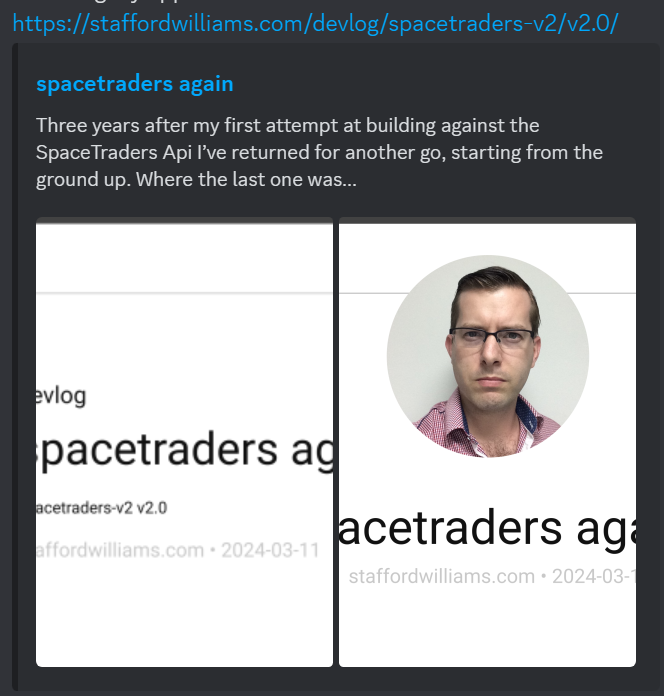
I’ll have to test on a dev site what this looks likes across platforms.
-
v3.0 - Dropping micro.blog
After a year of integrating with micro.blog to host my devlog entries I’ve decided it’s more hassle than it’s worth. The benefits of micro blog was the ability to post outside my git environment and have posts auto-tweeted.
Integrating proved difficult due to issues with CORS. Recently a Micro.blog server upgrade conflicted with my Cloudflare proxy meaning I would need to disable the rpoxy for Micro.blog to reestablish an HTTPS certificate (this would also break the CORs issue), and then re-enable it.
I decided to reduce the dependency on Micro.blog and have migrated the devlog into a collection within my own jekyll-generated site. This gives me the opportunity to have further control over the content and structure, for example the devlog permalinks which are a Jekyll plugin i’ve written in ruby:
Jekyll::Hooks.register :devlog, :pre_render do |page| permalink = "devlog/#{page.data["tags"].first}/#{page.data["version"]}/" page.data["permalink"] = permalink end -
v2.40 - Devlog
After posting some updates on garage I realised that I often have content that sits somewhere between blogging and note taking but I don’t end up writing it because it sits in neither. The result of this is that I’ve integrated micro.blog into my site via a devlog section on the homepage.
Micro.blog takes care of twitter cross-posting and I’ve edited its theme to look similar to staffordwilliams.com. As the rest of my site is static generated, I pull the content into the homepage via RSSParser. You can see the code in the source for
index.html.