
How I Build Software in June 2026
The pace of AI improvement has meant the way I build software looks very different to how I did six months ago, and again six months before that. The change over time is now so constant that it’s difficult to explain to others what the tools are and what my current approach is without sounding like the charlie-day.gif. In this post I hope to explain to you, and myself, what my approach to building software is right now.
A number of people in the community have defined levels of AI adoption and I operate at the top of these definitions - building an orchestrator. I’ve been building assist since December last year and 99% of my work starts with, and is managed by, that tool. Six months ago I was using Claude Code augmented by assist as a CLI/skill helper, but since implementing orchestration assist now controls Claude Code (and codex), manages the flow of work between agents, and is both the starting point and monitoring tool for all of my work.
Circumstance Matters
No universal AI workflow can be dropped into every engineering team. Each team has to work together to invent processes that fit their codebase, product, customers, experience level, and risk profile.
This is true for a team, or a solo developer, and whether components of a workflow matter for you is heavily dependent on what you’re building.
I have a number of machines that I build software on - sometimes simultaneously. My main machine is Windows, building primarily in WSL but also in Windows/PowerShell. I have a MacOS laptop and a linux server. I build software for my employer, for my employer’s clients, and for myself.
My preferred language is TypeScript and I build most projects with it, mainly due to familiarity, but also because of build speed and package availability. project-switch, my own application launcher, is written in Rust - but the agents write all of it and build it in docker, so I don’t know that much about Rust. I’m comfortable with Python and have client work that pushes me to use .NET (core and legacy Framework). Recently I wrote a bunch of AngularJS (yeah, the first one), because legacy.
Tokens are expensive, and if your access to tokens is restricted, so is your capability to operate at the upper levels of AI adoption. I have two AI provider subscriptions - a team account for Claude paid for by my employer and a ChatGPT Plus account that I pay for myself. Most of my building is done with Claude and I use Codex for smaller tasks like collaborative PR reviews. I have an RTX 4090 but am not using local models yet in my daily workflow - pricing and usage considerations do point at local models having more involvement in the near future.
Personal Backlog
My main entry point into the process is the Work Loop - defining the work that will be done against a given repository, and which of those items should be worked on by agents now. At the very start this requires the existence of a cloned (git) repo on my local, and the spawning of an agent to collaboratively define a feature to add, or a defect to fix. The spawning of the agent to do this used to be a CLI command (for example assist draft), but it’s now the click of a button in the UI.
My preference for these backlog items, which assist persists, is to have them be small. So, most items can be raised collaboratively with an agent quickly, with only a few questions asked and answered. Some items are discovered during the implementation of other items, in which case I can call /draft or /bug immediately within an agent session and it can use the existing context to raise those items, sometimes one-shotting the definition.
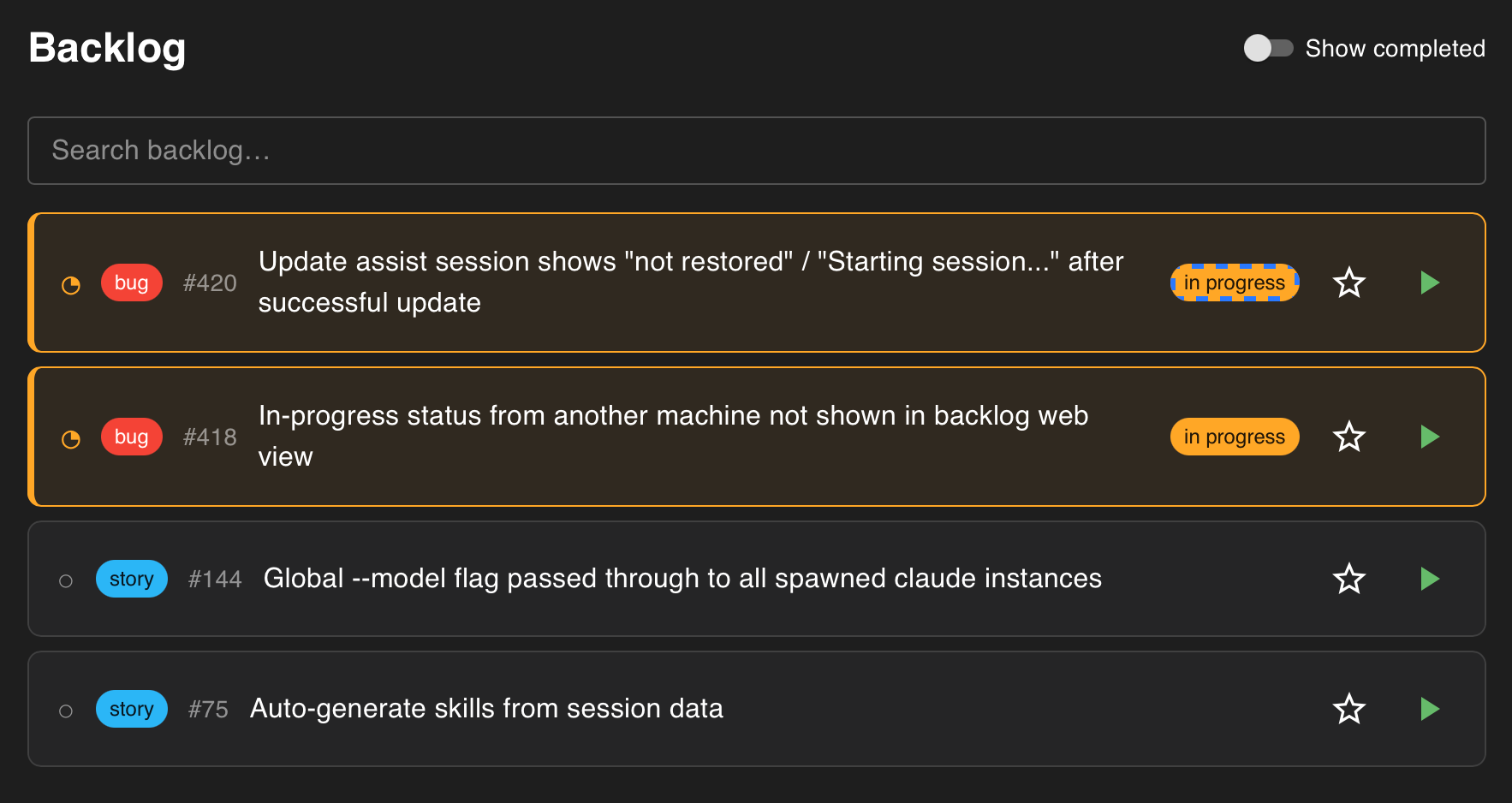
assist backlog
The result of this is a backlog, categorised by bug or feature and split by repository. A colleague helped me term this my “personal backlog”. It’s not a replacement for a team backlog, but rather the todo list I’d be otherwise keeping in a note taking app. When assist creates these items, it also splits them by phase (successive agent context windows) and adds acceptance criteria that will be used for non-deterministic validation of the work later on. If I later find information that changes things, I can collaboratively refine the item, again triggered by a button in the UI.
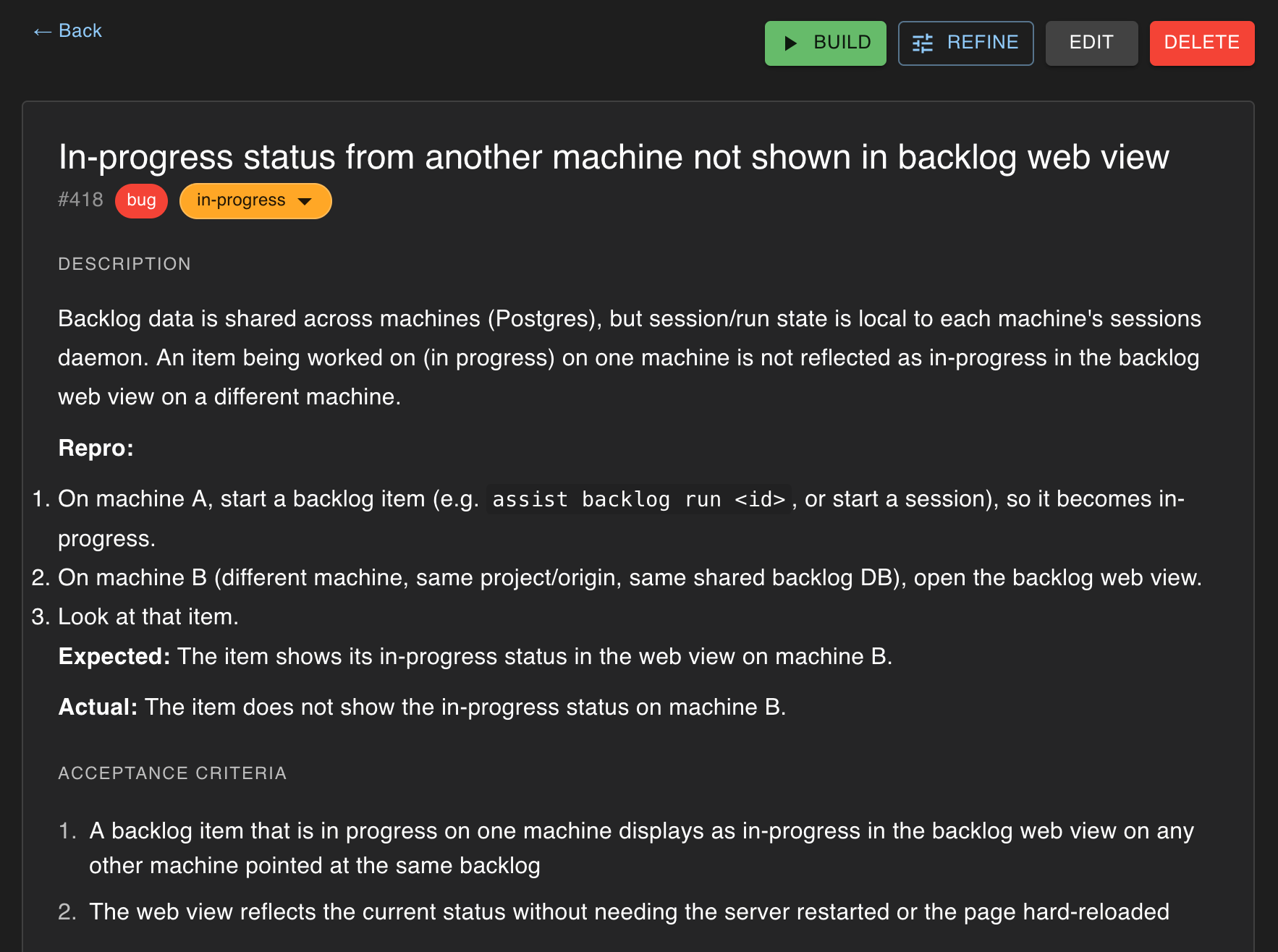
assist backlog item
Agent management
The assist UI displays a list of sessions, which are the currently spawned agents across my WSL and Windows environments executing on either a defined backlog item, or, creating a new item, or detached from the backlog as a stand-alone prompt against a repo. I don’t run agents unattended, so every morning this view is empty, and I choose which backlog items from which repositories I want to start - clicking a button on them to spawn the new session.
Each session is initially prompted by the detail from the backlog item, and the tasks for the specific phase within that item. The phase is a single context window where the agent makes tool calls to reach the phase goals within the verification constraints. The agents run with auto mode configured so permission requests are low. Many permissions are automatically denied and routed through assist tooling, like git commit to ensure changes are constrained by my preferences.
Sessions are presented as cards displaying their current status, backlog title and phase number. Selecting a session displays the agent terminal which can be interacted with (or interrupted) as normal. Sessions are either agents running, completed, or waiting for a decision from the user.
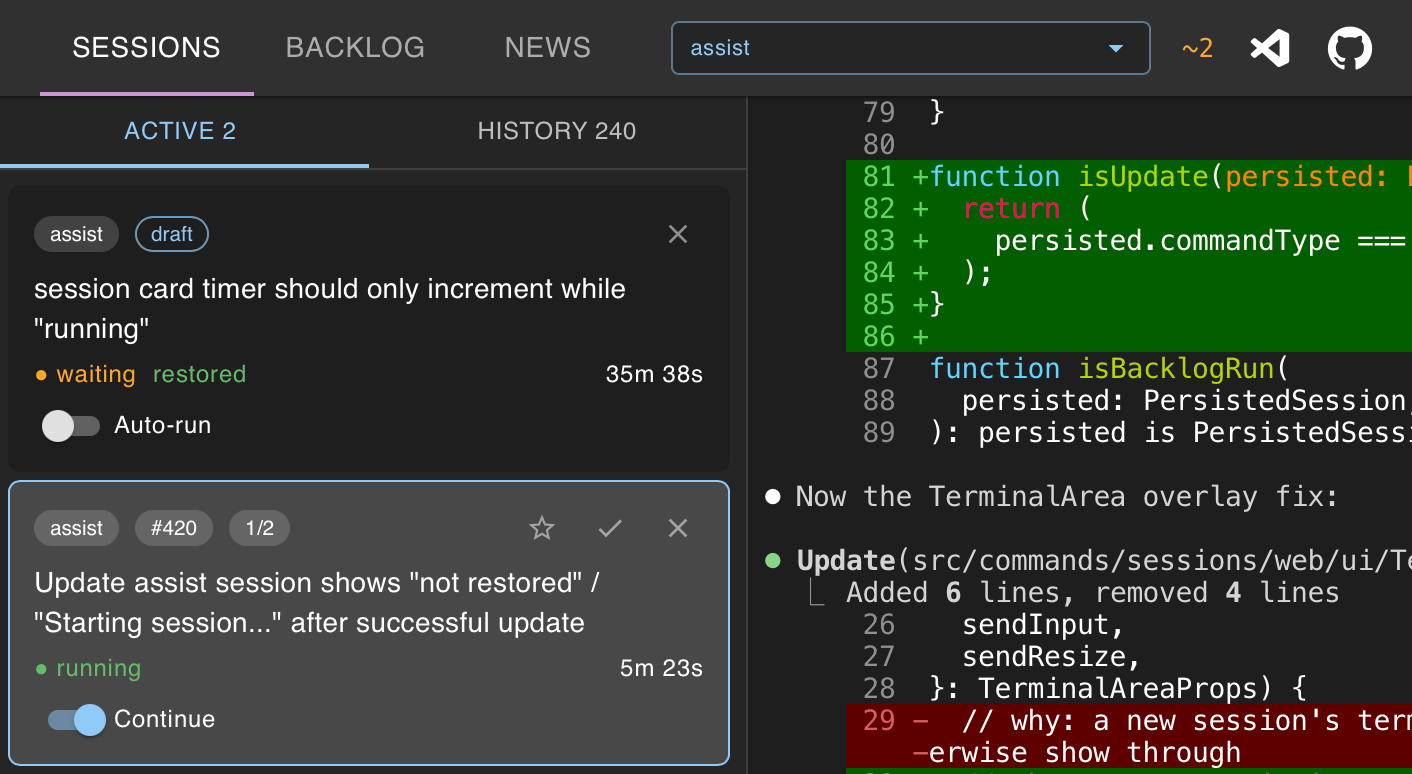
assist sessions
Delivery speed
The ideal scenario for implementing any backlog item is for all of the following to be true:
- the backlog item is small in scope
- the codebase is sensibly arranged and of high quality
- verification restrictions are high
- the right model is selected and configured correctly for the current task
- analysis of where the model falls short is included as guidance (for example
CLAUDE.mdor other prompt injection) - the model provider is not being shady (like gimping the model or quietly routing us elsewhere)
If the ideal scenario is met, then:
- Changes to code made by the agents are high (or acceptable) quality
- Some backlog items can make it through to the final phase without human intervention
Every point that needs human interaction is a bottleneck in this flow. And a key goal of orchestration is to automate as many of those out of the workflow as possible. If human interaction for any given piece of work is low or none then speed of delivery is how quickly agents can execute through the workflow. Provided verification checks are quick then the bottleneck is tokens/per second. While some LLM providers allow faster token throughput at higher cost, subscription plan pricing means we can parallelize work at no increased cost.
Managing multiple agents
While one agent is delivering one backlog item, additional instances can be spawned to deliver other backlog items either within the same or another repo. This starts easily with multiple terminal windows and switches the bottleneck from tokens per second back to human interaction. Achieving a flow state with terminal windows is difficult - the information required to quickly switch between them is within pages of scrolling text. One of the key reasons to move assist from CLI to UI is to present to a user information optimized for determining where human interaction is required.
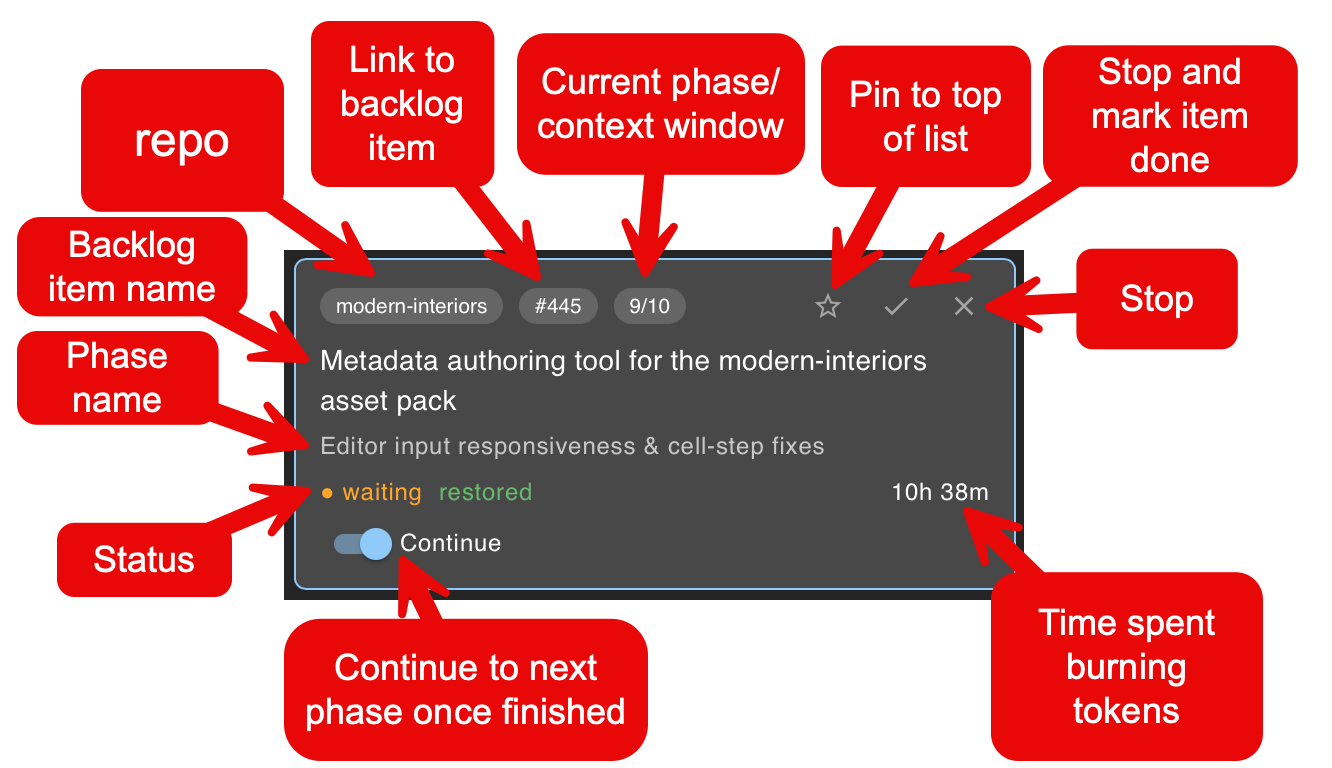
assist session card - the status of a single agent right now
The purpose of the UI is to surface key information quickly. Selecting any session card reveals the session itself - a Claude Code instance running in the terminal. A user switches to any session card that is waiting and provides the human interaction needed to unblock the continuing automation. Sessions marked done are backlog items completed and can be dismissed manually or automatically, and replaced with new items. Sessions that are running are agents burning tokens.
At a high level the bottleneck is you - can you define enough work correctly so agents don’t need to stop for input. I will normally have 2-6 agents running at a time, and switch between sessions for human interaction as needed. When the ideal scenario plays out this can deliver a lot of software fast and is both exhausting and exhilarating.
Inspect and Adapt
If the ideal scenario is met for all items then great speed is reached and much software is delivered. But this is not always the case, and for each task there’s a chance that some of the ideal scenario traits are not met and analysis of why and the determination of a solution is required. This pattern of delivering software per some process and monitoring its effectiveness and changing both the process and the work as we go for a better outcome pre-dates AI code-assist.
This also means that just because some items can be delivered with little to no human interaction, software development is not solved. There are still rabbit holes of despair and teeth gnashing, collaboratively with an agent, when a fix is unclear (or impossible), or when a subpar solution continues to break due to its fragility. Or, when your familiarity is just so low that you think you’re asking for the right thing but really you’re not. In these scenarios, thought is required, and experience can help course correct early.
In summary, the way I build software has changed in some ways, but remains similar in others. Typing out code is radically different and continuous improvement is more important than ever. The automation possible via LLMs means far more things are codified within a personal workflow than before - todo lists and shaping work (personal backlog), integration with collaborative tools like Slack and GitHub, and even automations that help debug running software like log retrieval (seq) and environment inspection (Azure CLI). Some things are quicker, but some things still take too long. Oddly, the complexity and limits of LLMs make building software both easier and harder.