
spacetraders-v2
My second implementation against the spacetraders api is a server based automation supported by Grafana dashboards · source · devlog · spacetraders api · data browser
-
v2.14 - more data browser
I’ve continued down the data browser rabbit hole and still have not yet built the pathing visualisation which was the purpose of its creation.
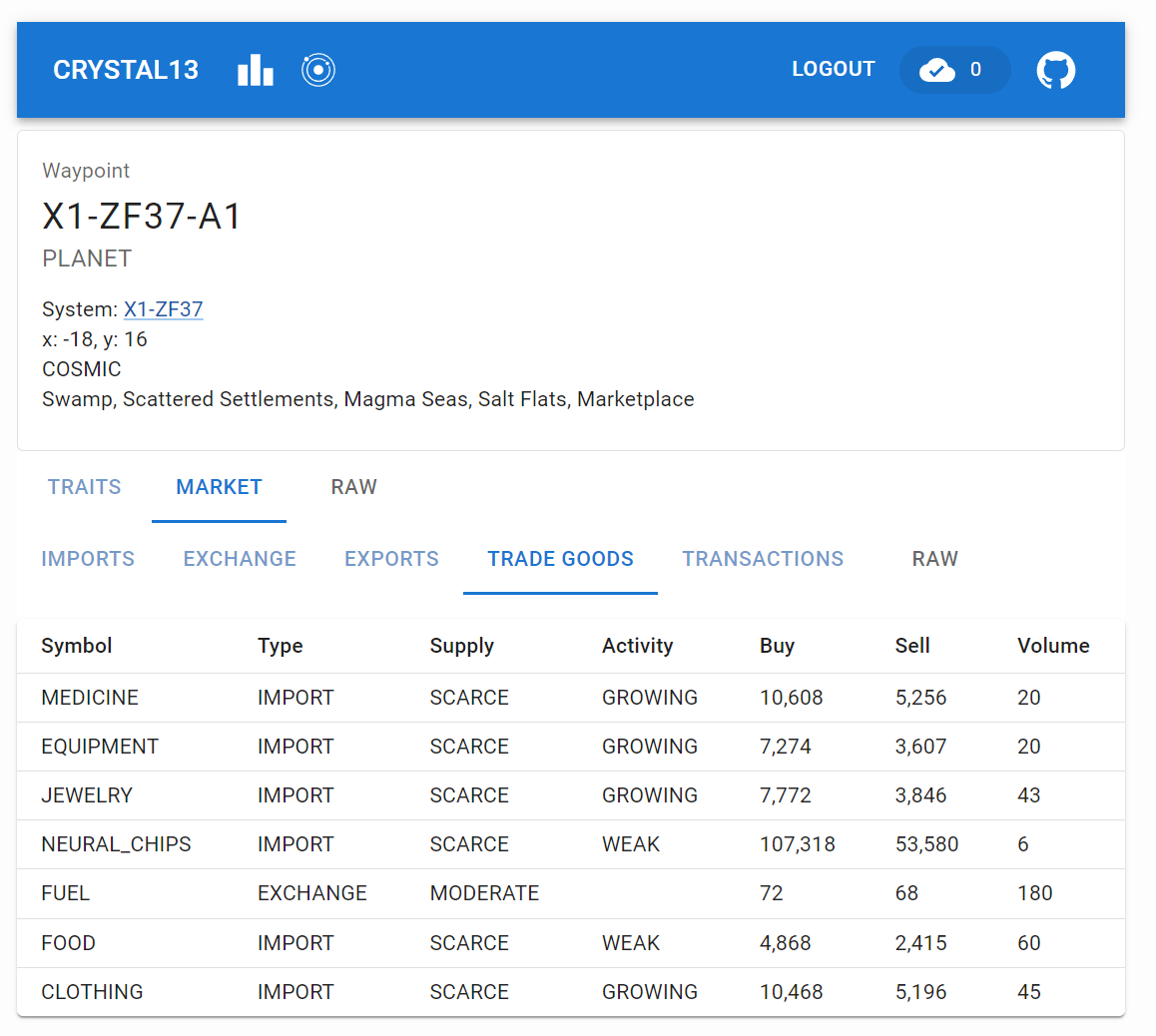
spacetraders data browser - market Instead, I’ve built out most of the ship and system waypoint views and surfaced a good chunk of the api data. Considering most of the api calls are very similar, I was able to create a few components that can be reused across the different views.
All API calls the data browser makes are via async jotai atoms. Most of them use loadable and so I wrote RenderLoadableAtom to take care of the loading, error and success states of components that display that data.
All of the actual calls these atoms make are via the same api factory I wrote over the generated openapi output. This factory wraps every call with bottleneck to globally rate limit any call and retryable from the async library to handle and retry any 429s. This allows logic in both my automated backend and the standalone data browser to make requests without needing to worry about rate limiting or retries.
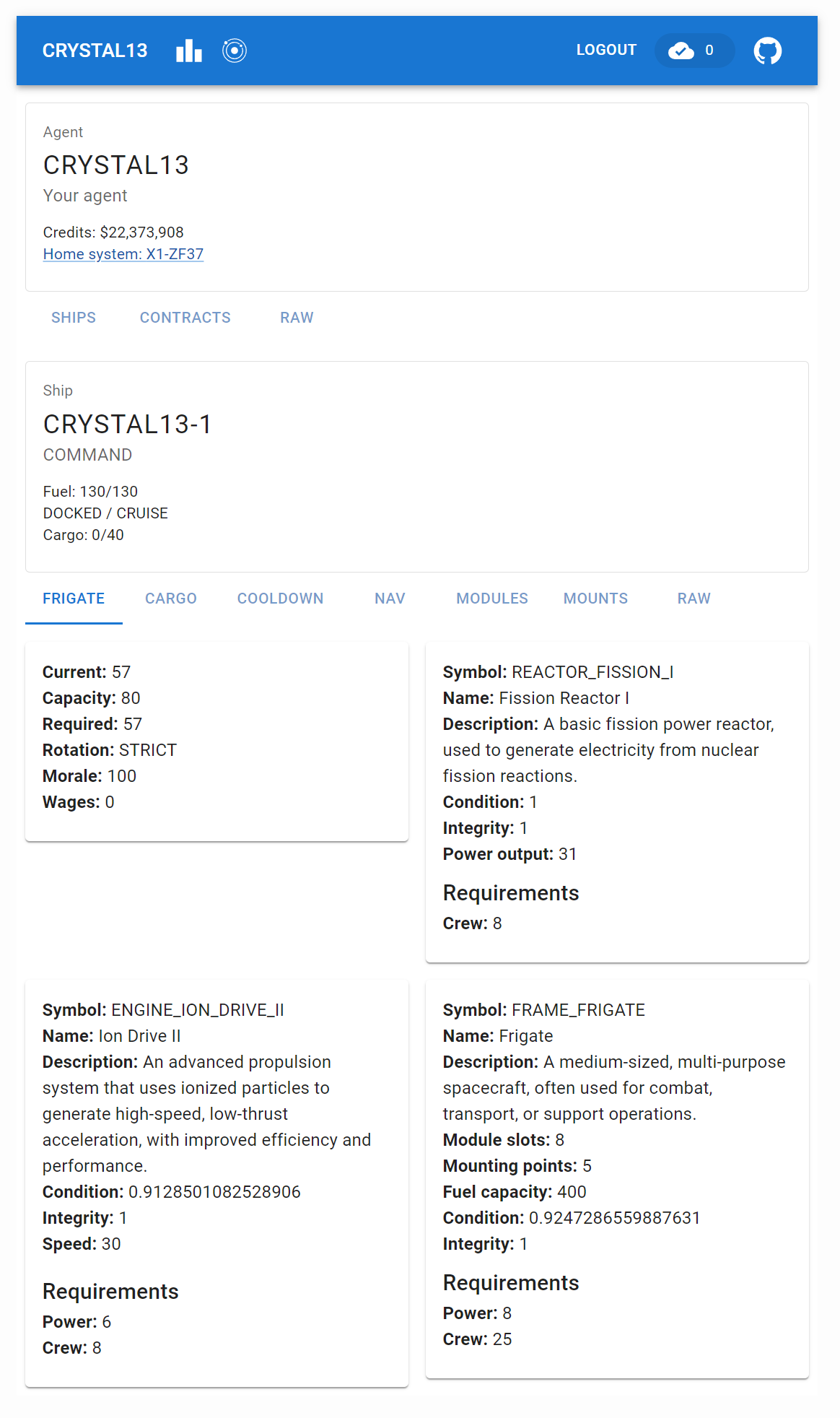
spacetraders data browser - ship Finally, I added a TabStructure component to split data returned by endpoints into tabs and hooked it into react router. This component is also dependent on a loadable atom and includes an automatically appended Raw tab which displays the raw json returned by the api - this comes in handy when viewing data that hasn’t been bound to a component yet.
With easy data access and a reusable component pattern I’ve ended up spending too much time building it out rather than focusing on the path visualisation which will be my next task.
-
v2.13 - data browser
My ship pathfinding is not working great and my command ship (and haulers) are constantly flying to locations without fuel and then spending a bunch of time drifting to the next location. Trying to visualise pathing (and eventually supply chains) in Grafana is proving too difficult with the format Grafana expects things to be in, so, I decided to build a front-end data browser to help understand what is going on.
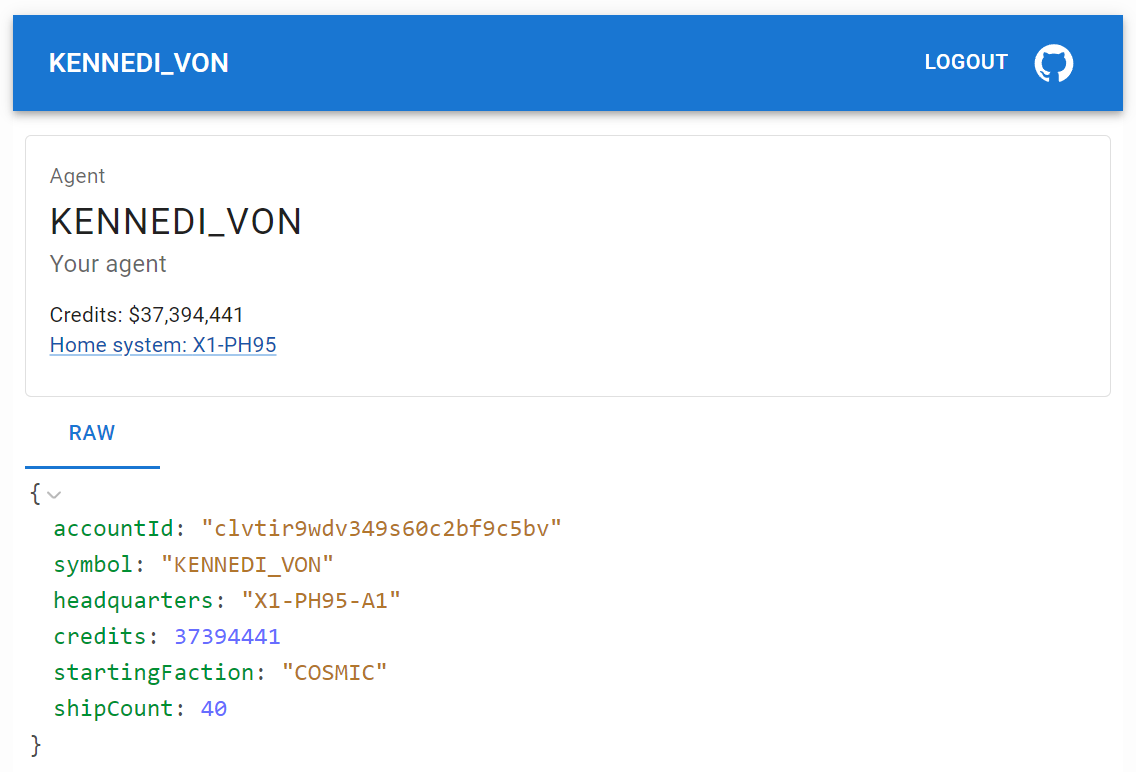
spacetraders data browser This ended up turning into a rabbit hole that saw the creation of this data browsing tool which so far does not visualise pathing or supply chains, but is proving handy to surface and explore data from my existing api code. Eventually I intend to build out mapping and pathfinding functionality into the tool.
-
v2.12 - reset 2024-04-09
SpaceTraders resets every ~2 weeks with all players required to re-register their agents and start from scratch. The end of reset 2024-04-09 saw my agent finish up just under 12 million which was enough to have it appear on the leaderboard, no where near the top as I continue to implement basic systems.
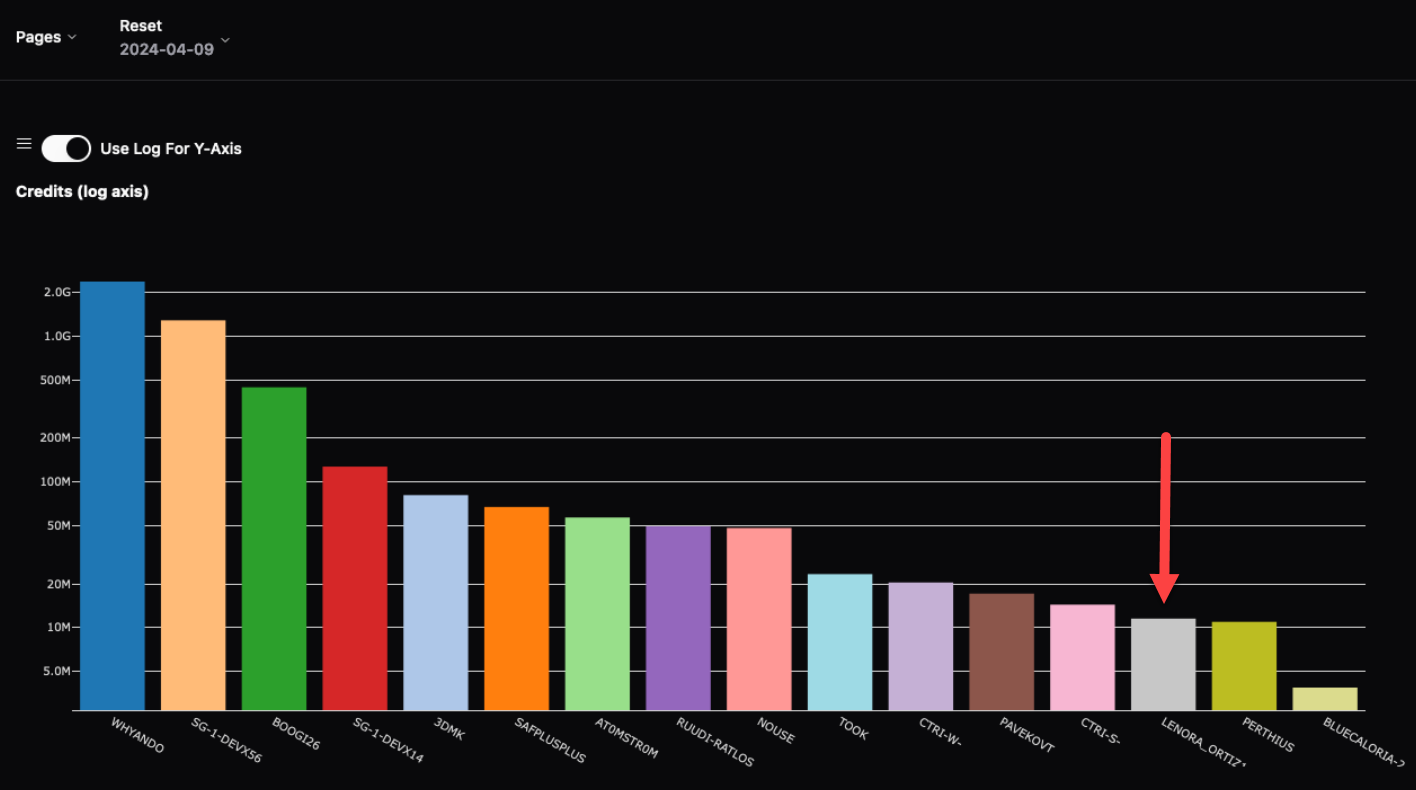
Screenshot from FloWi's Leaderboard app Now that I am monitoring markets I’ve implemented trading where ships will attempt to buy low and sell high. This reset has lasted more than the expected couple of weeks however and other agents in my starter system have already contributed to market prices being less profitable.
The leader in most credits for the reset was
whyando - Justinand they shared an excellent overview of their approach on discord.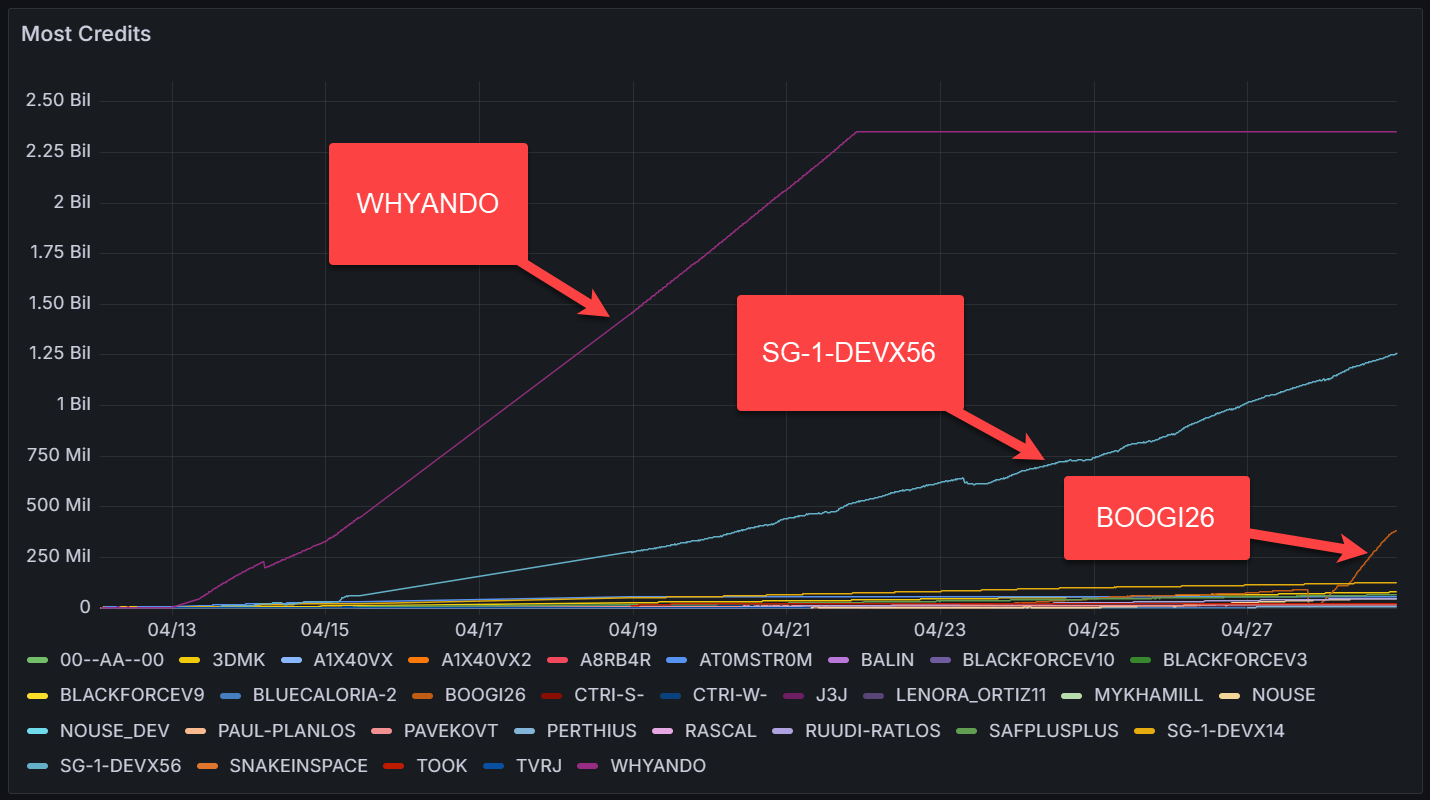
Off the back of this I’ve started to explore the supply/demand mechanics myself and saw the price of
EXPORT IRONdrop as I supplied the same waypoint with itsIMPORT IRON_ORE. I implemented surveyor logic to facilitate improved extraction, but noticed that the price and trade volumes change over time gradually so I’ll need to limit my logic for over-supply.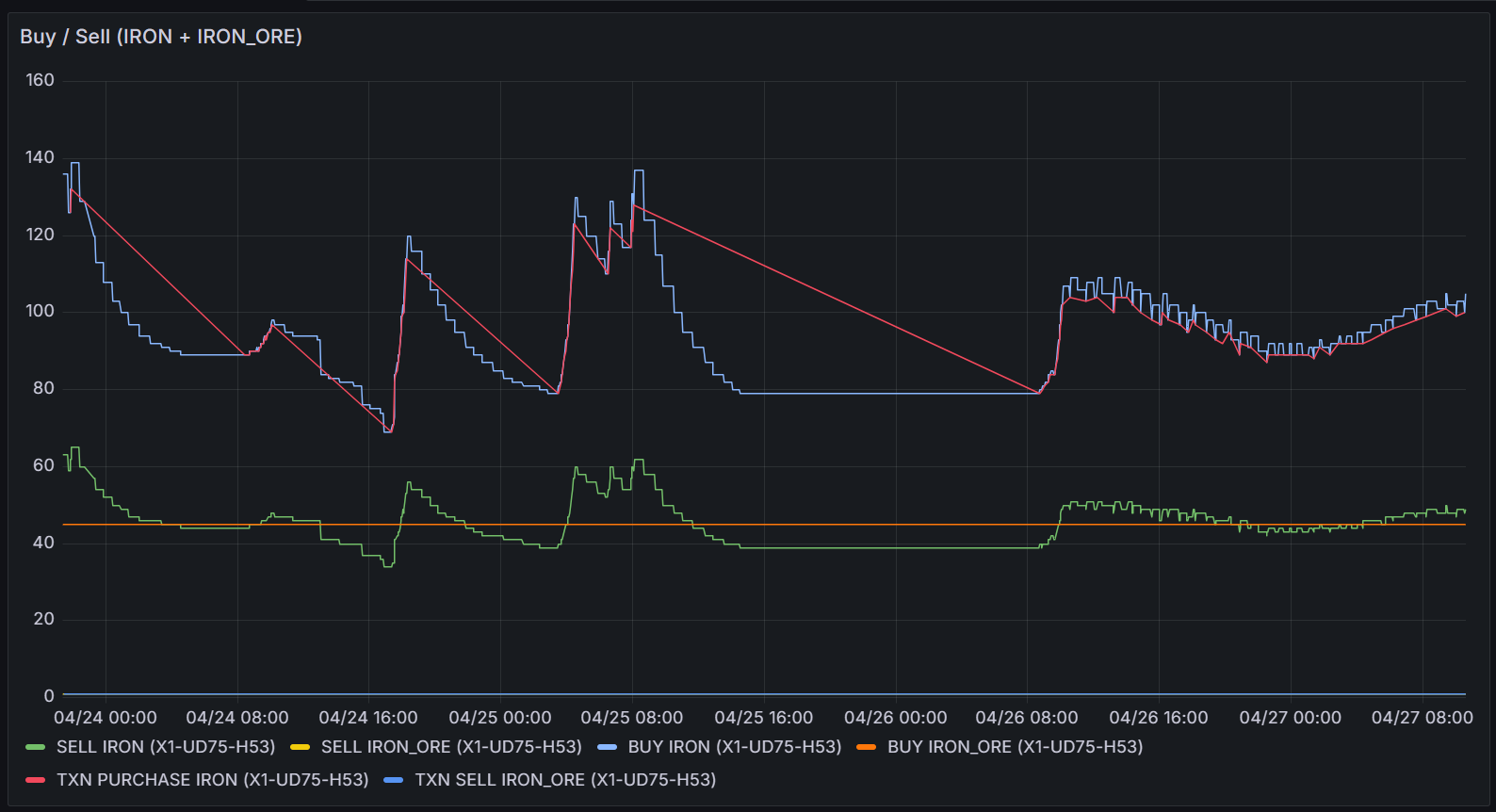
-
v2.11 - monitoring markets
Contracts have proved profitable enough to get me onto the leaderboard, though there’s still a few problems.
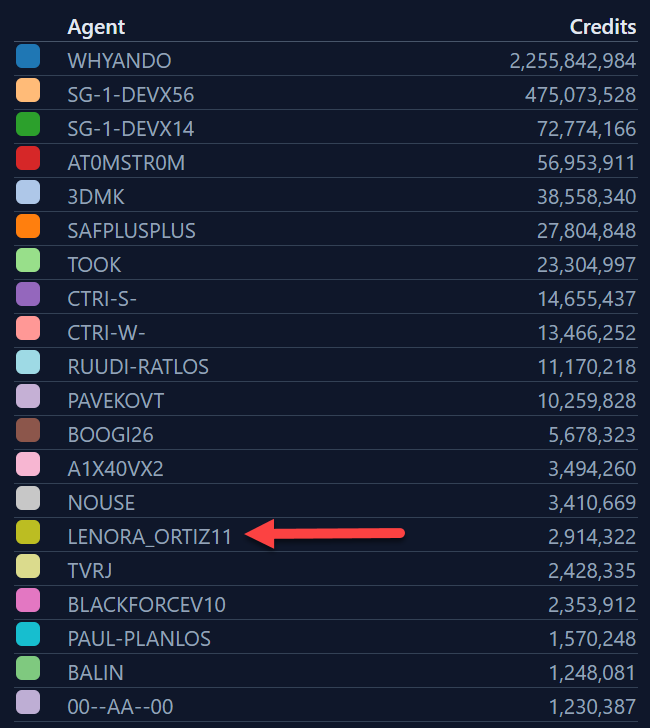
leaderboard There were still a few routing issues that mean the ship was flying through areas with no fuel. I was able to pull the routing code from my earlier work for v1 and adapt it for v2 so the ship is now less likely to to navigate through areas without fuel. This still happens when there is no direct route however, and I still need to write code to buy fuel and store it in cargo to reduce the amount of legs the ship needs to drift
Additionally, there was at least one contract where the earnings were negative - for now I’ll just wear this cost but there could be opportunities to source the goods cheaper in other systems or via refining.
Now that contracting is working, I’ll need to start using the data collected from markets to increase profits by trading goods. I’ve built another Grafana dashboard to help monitor market goods and prices, and, I’ve implemented code to buy and navigate satellites to market waypoints to monitor prices.
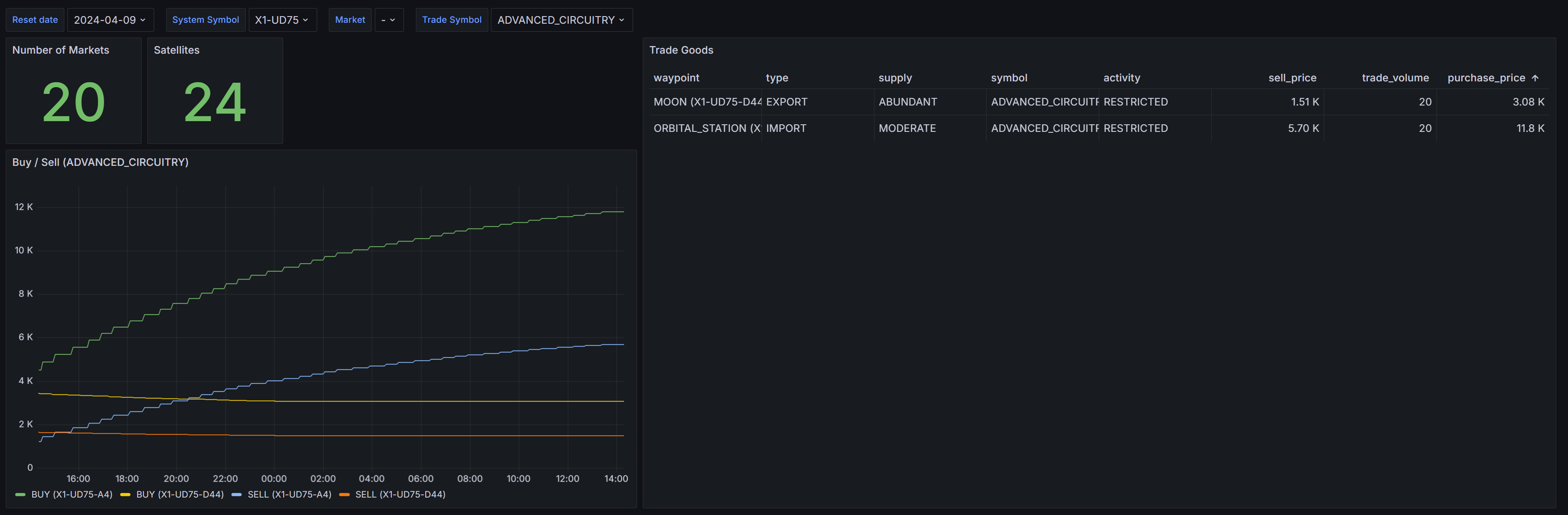
market dashboard -
v2.10 - trading contracts
With my hourly income going into the negatives due to bottoming out the price of ore, I’ve spent some time implementing a trading approach for the command ship so I can complete contracts that require trade goods. This required at least a lap of the markets in the system to probe the price details of each trade good. This recon went well until the final waypoint that appeared to have a market but no fuel - the ship promptly ran out of gas and I had to write code to drift to the closest waypoint with a fuel supply. After the recon was complete, contract trading appeared to work until the ship got stuck in a loop between waypoints.
On investigation it appeared the current contract required the ship to move through a distant waypoint that expended most of the fuel, and had no fuel supply. Drifting back to the nearest waypoint with fuel available executed correctly, but then the logic would push the ship back through the same distant waypoint and the cycle would repeat. I’ll need to update the navigation logic to be aware of fuel requirements and availability so the ship can buy extra fuel and store it in cargo should a route require it.
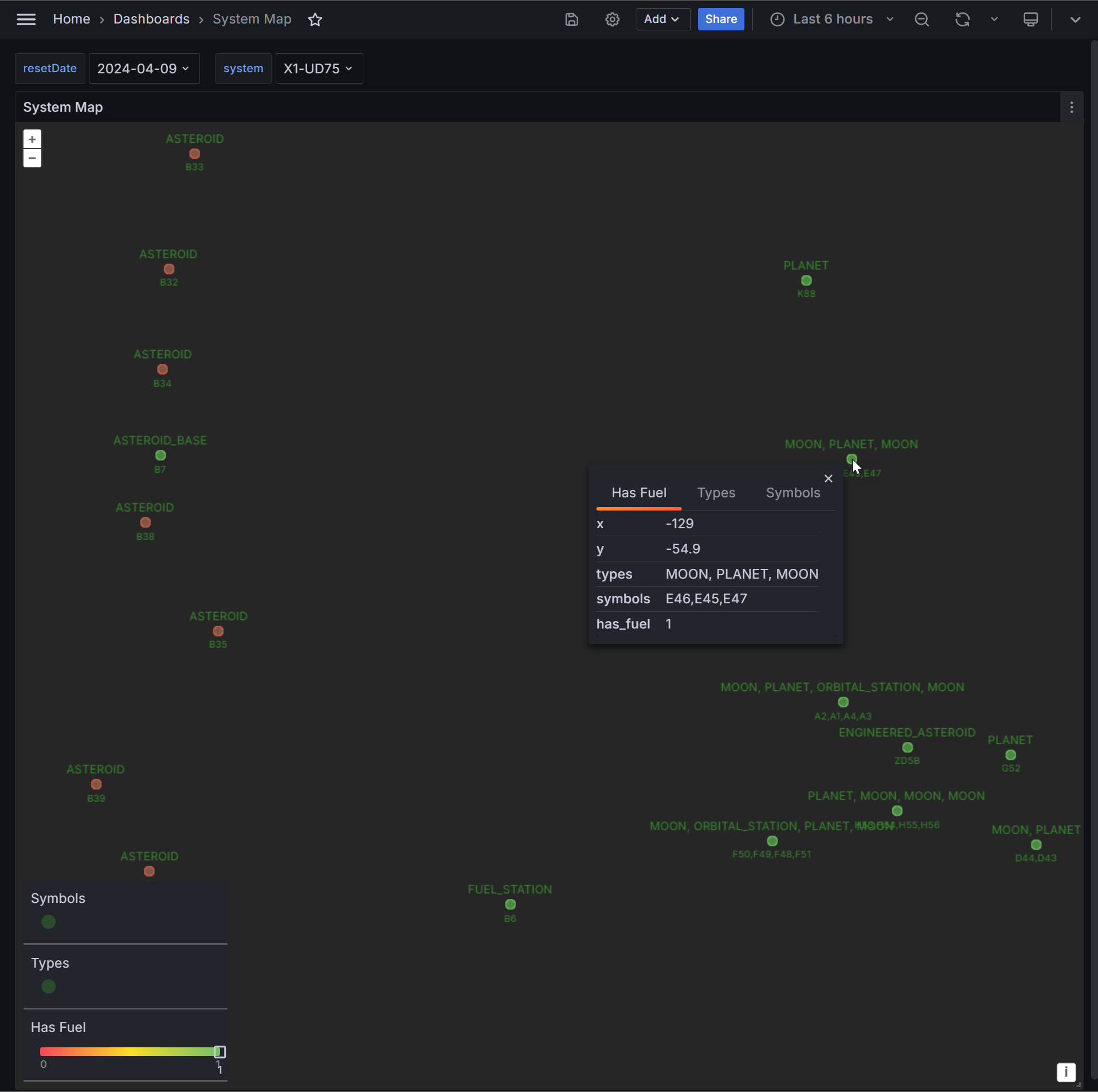
To help with this, I’ve added a Grafana panel that allows me to visualise the layout of waypoints in the system. I was unable to find a cartesian plane or similar visualisation in Grafana, so instead i’ve hacked the Geomap visualisation to achieve this. I’ve chosen an empty point in the ocean, zoomed in as far as it’ll go, and used that point as the origin. I’ve then plotted the waypoints of the system as offsets from this origin. Perhaps in the future I’ll add ship position to this panel.
-
v2.9 - improved waypoint monitoring
Increasing the mining drone count to 20 eventually caused the price of all ore in the system to bottom out and I had to stop the automation as it was slowly losing credits. I’ll need to improve how I monitor the market across waypoints so I’ve added a bunch of code to do this.
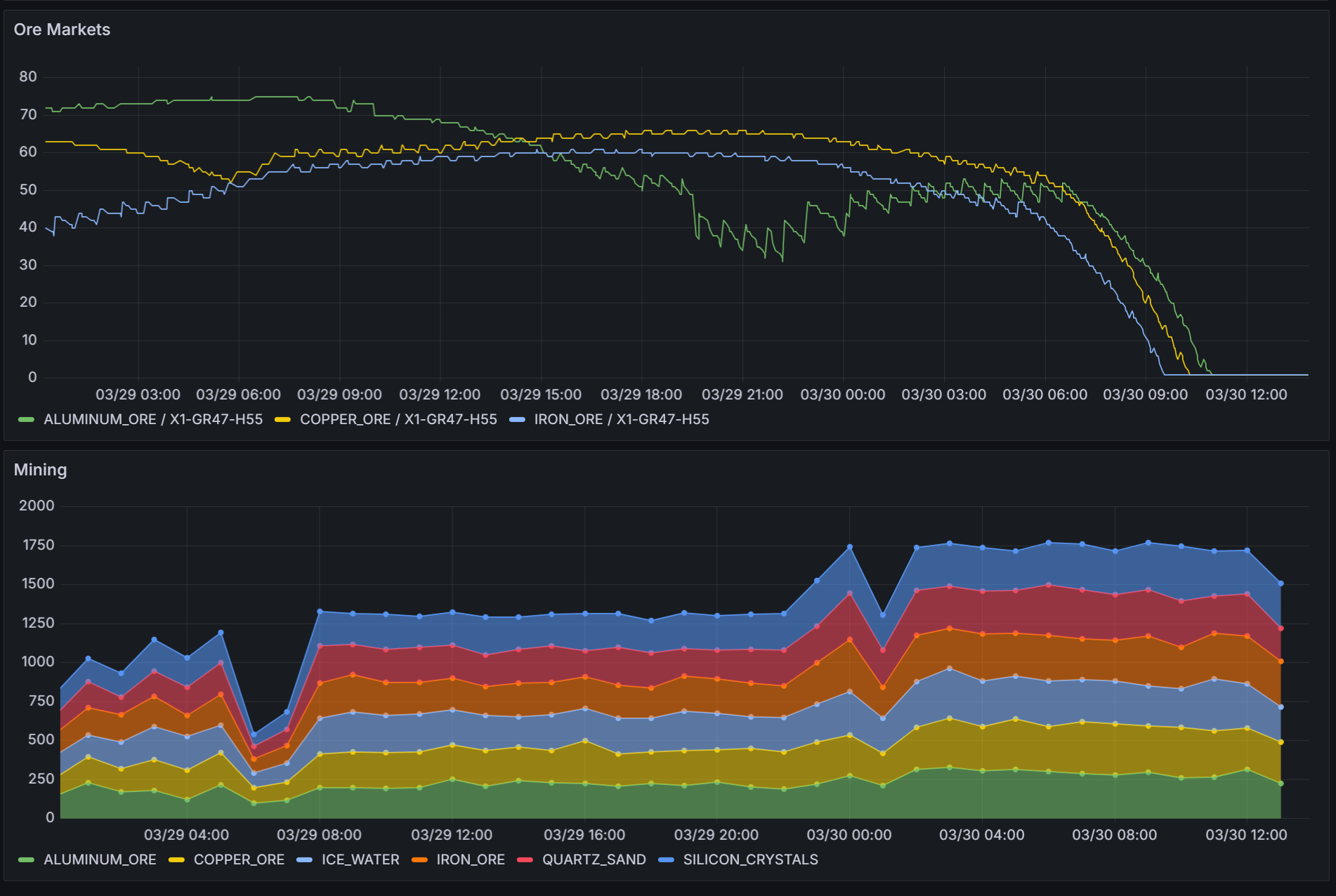
Ultimately i’ll use probes to periodically check each waypoint, but I need to write the probe automation to do this. I’ll have to purchase probes over time and slowly send them out across the system, starting with the waypoints closest to the
ENGINEERED_ASTEROID. A quick route to euclidian distance in Postgres is to use the cube extension:with originCTE as ( select cube(array[x,y]) as position from waypoint where reset_date ='2024-03-24' and type = 'ENGINEERED_ASTEROID' ), distanceCTE as ( select waypoint.*, cube(array[waypoint.x, waypoint.y]) <-> originCTE.position as distance from waypoint join originCTE on 1=1 where reset_date ='2024-03-24' ) select * from distanceCTE where 'SHIPYARD' = any(traits) or 'MARKETPLACE' = any(traits) order by distance; -
v2.8 - over supply
The shuttle logic was modular enough that it was trival to refer the command ship to it should the command ship have already performed its logic. Turns out the command ship has a much larger engine and with 10x the speed I needed more mining probes to keep the transports busy. The result of this was a plummeting ore price as I over-supplied the market.
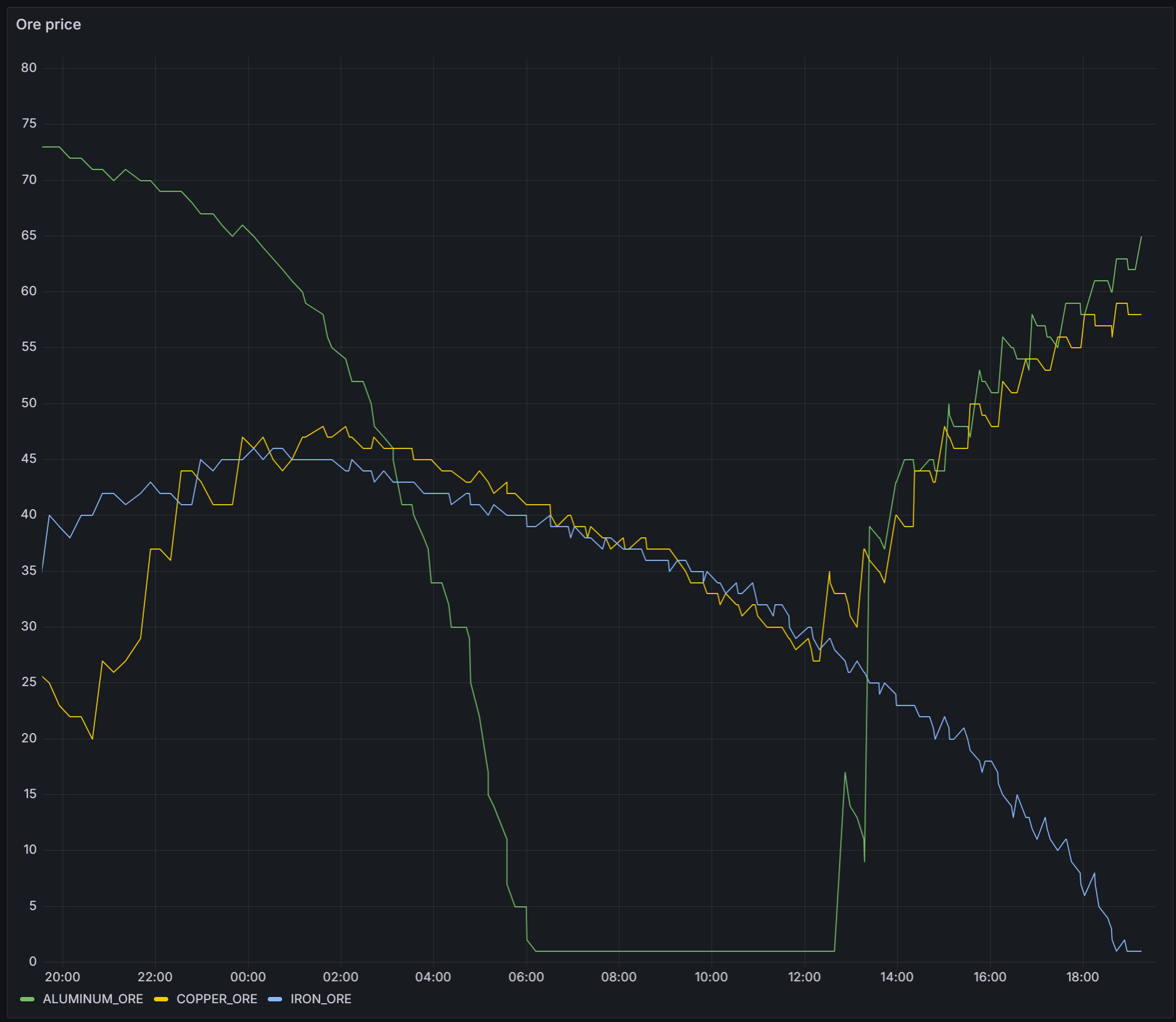
I do not know at this stage what causes the price to bounce back.
My grafana dashboards are becoming complex, and I need to implement some kind of backup/restore for them - to de-risk this in the short-term I’ve started to commit my more complex queries as views to the database.
-
v2.7 - increased mining activity
After purchasing a
SHIP_LIGHT_SHUTTLEto transport mining results from the mining drones to their import markets I found that the round trip was too long and mining drones were filling up their cargo holds before the shuttle has delivered all the goods and returned. The immediate resolution for this was to jettison non-ore results, meaning the shuttle needs ferry between the asteroid and a single market. After automating the shuttle I realised my command ship also has similar cargo space so the same shuttle logic could be applied to it when it’s not otherwise doing anything.The big drops in Credits/hour below represent the automation buying new ships.
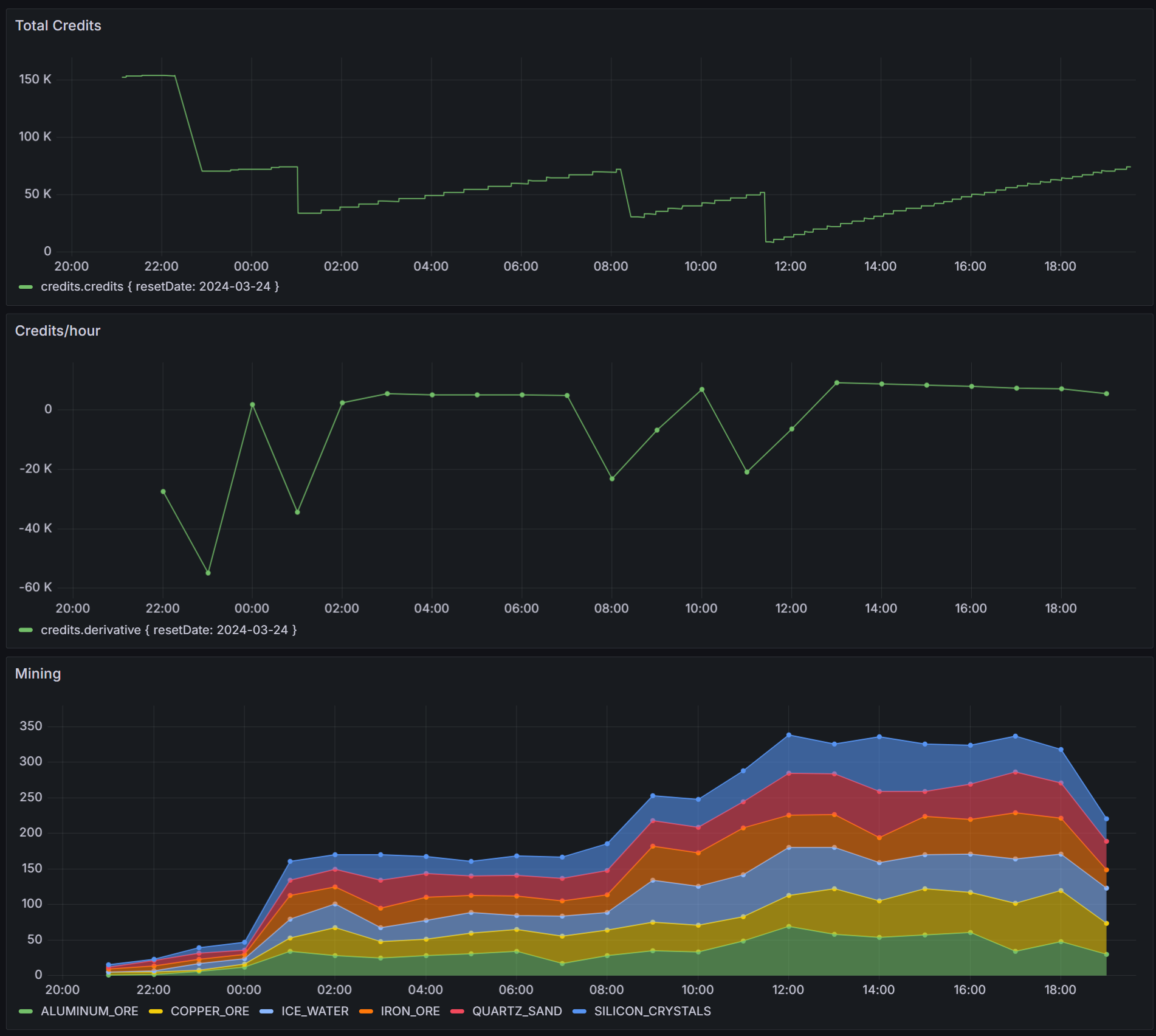
With increased mining I’m seeing a slow decrease in Credits/hour which I presume is the result of constant selling ore. I can confirm this once i’ve implemented some improved market monitoring, though I also want to see what effect
SHIP_SURVEYORcan have on my mining operations. -
v2.6 - extracting ship automation
I’ve written logic to automate negotiation of new contracts, but the first time this executed it resulted in a contract that required a resource that is not the result of mining. I’ll need to add further automation to cater for this case.
I have extracted the mining drone logic out such that a similar logic loop can be used with any ship:
- If in transit, wait for the ship to arrive
- Perform some action based on inspecting current state
- Repeat
The command ship now uses this same logic and additonally spawns additional actors, in this case the single mining drone. I’m logging a bunch more data, like credits and waypoint status and am now set to choose the next optimisation to apply.
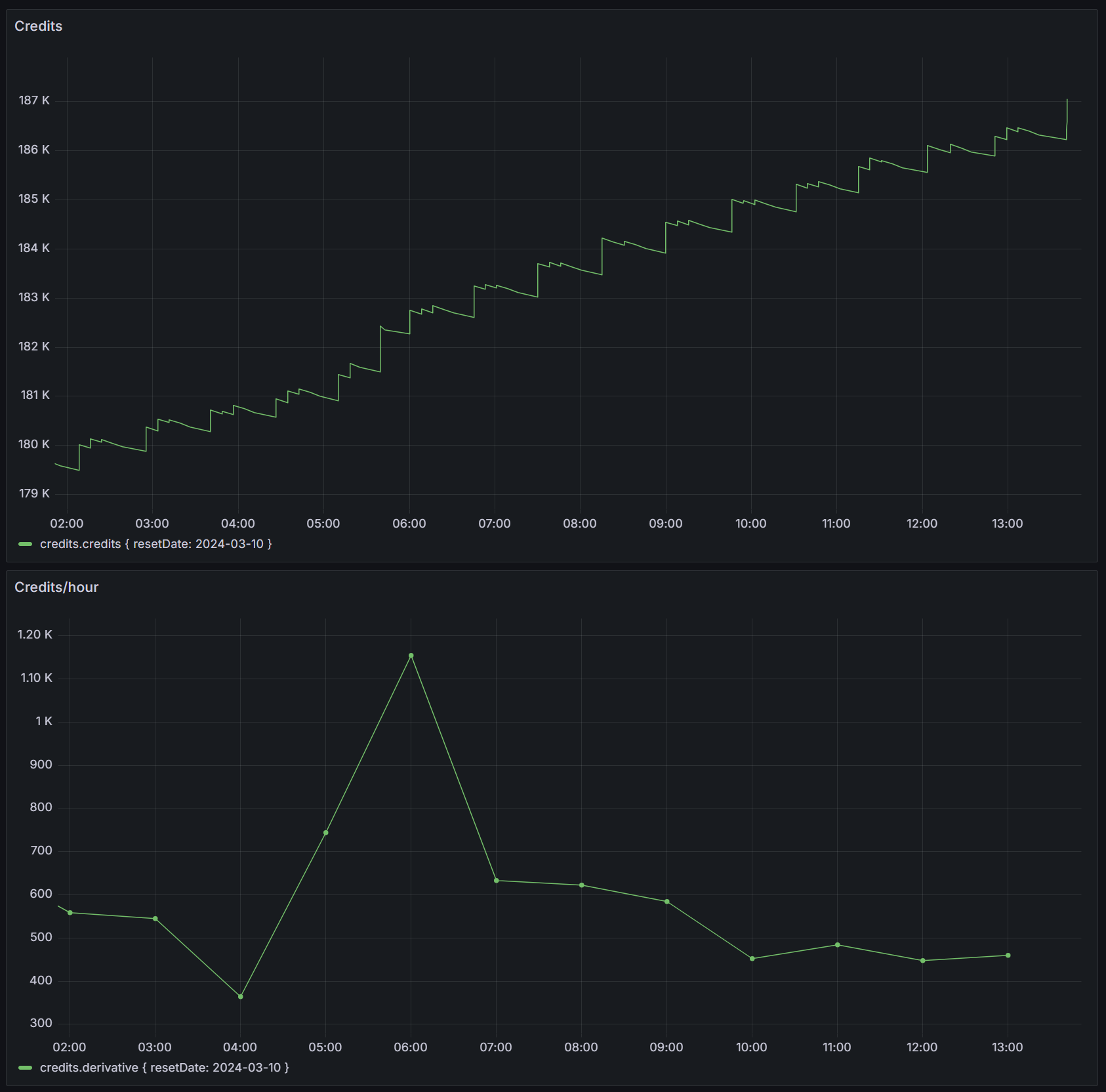
The mining drone logic is very slow as it uses the same ship to both extract and once the cargo hold is full, deliver the excess trade goods. I intend to add additional mining drones to the fleet, but before I do this I’ll add shuttle logic so the mining drones can focus on mining, while cheaper shuttles perform the delivery.
-
v2.5 - first contract delivered
I’ve completed the first round automation such that a new agent can be spawned and it will complete all actions of the Quickstart including Fulfilling the contract. I’ve also added code to pickup subsequent contracts but the first time this occurred the contract required a resource that is not the result of mining, so I’ll need to add further automation to cater for that case.
I’m saving state from some of the api responses to postgres and using the existing types the api returns in combination with postgres jsonb columns to store the data. By default Adminer truncates long JSON columns. While a plugin exists to solve this the adminer docker container only includes official plugins. To solve for this, i’ll use the docker compose feature dockerfile_inline:
adminer:
    build:
      dockerfile_inline: |
        FROM adminer
        ADD --chmod=644 https://raw.githubusercontent.com/staff0rd/adminer-plugins/master/AdminerJsonPreview.php /var/www/html/plugins/AdminerJsonPreview.php
    restart: unless-stopped
    ports:
      - '8080:8080'
    environment:
      ADMINER_PLUGINS: 'AdminerJsonPreview'
This approach allows me to extend the adminer container without having to have a
Dockerfileon disk, and thankfully ADD supports fetching files from the internet, so I don’t need the plugin on disk either. -
v2.4 - first automation
I’ve implemented some fairly rudimentary automation that covers the first five of the six quickstart steps. This includes:
- Registering a new agent should one not be persisted for the current reset date
- Accepting a contract
- Purchasing a mining drone and sending it out the an asertoid
- Refueling and mining the asteroid
- Transiting to markets to sell the ore
I went down a particularly unpleasant PostgreSQL docker container permission issue and was ultimately unable to solve it. I’ve improved the error handling and have stack traces available in Seq, and solved wrong line numbers in ts-node/Node v20 stack traces. I’m now persisting market data in postgres to reduce api calls and have also introduced bottleneck to stay within the rate limits of the spacetraders api.
To complete this first round of automation I still need to:
- Add some routing capability so ships can move between waypoints for journeys that otherwise can’t be made directly due to fuel constraints
- Deliver contract goods to their destination and fulfil the contract
-
v2.3 - initialising mikro orm
I’ve been on the lookout for a replacement for typeorm for some time and mikro orm looks promising.
The quickstart does not have enough information to get the tool running end-to-end in a typescript environment, so the longer Getting Started - Chapter 1 is required reading too. Even so, there were some additional gotchas that meant a bit of googling, a bit of debugging, and a few hours in total to get the tool running. These commits (one, two) show what was changed to add mikro-orm.
I had to swap out
tsxforts-node, considering mikro (like typeorm) also uses typescript decorators that esbuild does not support. There’s a bunch ofpackage.json/tsconfig.jsonsettings that need to be correct for this to work, and ultimately the only way I could makets-nodehappy was by starting the app withnode --experimental-specifier-resolution=node --loader ts-node/esm ./src/index.ts. This however does not allow the tool to detect correctly thatts-nodeis in use (source) at dev time, and confusingly it will return aNo entities founderror as it’s actually looking indistfor the entities and notsrc. Explicitly setting{ tsNode: true }in config solves for this though finding this solution required debugging into the library and before fixing it my app was silently exiting without any error message.The tool has a CLI and one of it’s features, which, once installed is executed via
npx mikro-orm, however, in the case of typescript it must be executed vianpx mikro-orm-esm. One of the nice features of the CLI is that it confirms your configuration. Although a working configuration at CLI time can still stuffer from theNo entities founderror at runtime without the fix above.$ npx mikro-orm-esm debug Current MikroORM CLI configuration - dependencies: - mikro-orm 6.1.9 - node 20.10.0 - knex 3.1.0 - pg 8.11.3 - typescript 5.4.2 - package.json found - ts-node enabled - searched config paths: - /home/stafford/git/spacetraders-again/src/mikro-orm.config.ts (found) - /home/stafford/git/spacetraders-again/mikro-orm.config.ts (not found) - /home/stafford/git/spacetraders-again/src/mikro-orm.config.js (not found) - /home/stafford/git/spacetraders-again/mikro-orm.config.js (not found) - configuration found - database connection succesful - `tsNode` flag explicitly set to true, will use `entitiesTs` array (this value should be set to `false` when running compiled code!) - could use `entities` array (contains 0 references and 1 paths) - /home/stafford/git/spacetraders-again/dist/**/*.entity.js (not found) - will use `entitiesTs` array (contains 0 references and 1 paths) - /home/stafford/git/spacetraders-again/src/**/*.entity.ts (found)There is a heap of documentation and google might be required to find docs specific to a given error message. An example is this monster stackoverflow answer where the author of the tool explains one of the error messages I encountered. There’s almost a little too much to learn, such that the early getting started documentation almost presumes you can make decisions about topics that you haven’t yet learned about, for example the Metadata Providers and
ts-morphwhich is used to infer more schema via type information rather than decorator annotations.Once the CLI was configured, and the separate migrations library installed and referenced, migrations appeared to Just Work™️. Once runtime was configured, read/write appeared simple enough. With the gotchas out of the way and the setup time spent, I’m looking forward to using the query functionality further as I build out more of my app.
-
v2.2 - maintenance items
I was hoping to hit some new endpoints and try out MikroORM tonight but instead some fairly boring quality-of-life improvements took up my time.
- I added a job queuing feature that will remove existing queues if they don’t match the pattern currently configured. This allows me to change queue scheduling and know the old queues will be cleaned up
- I added authentication to Seq - turns out it will block querying for ten minutes if it thinks multiple users are accessing it
- I added update scripts to pull, rebuild and restart the app docker container
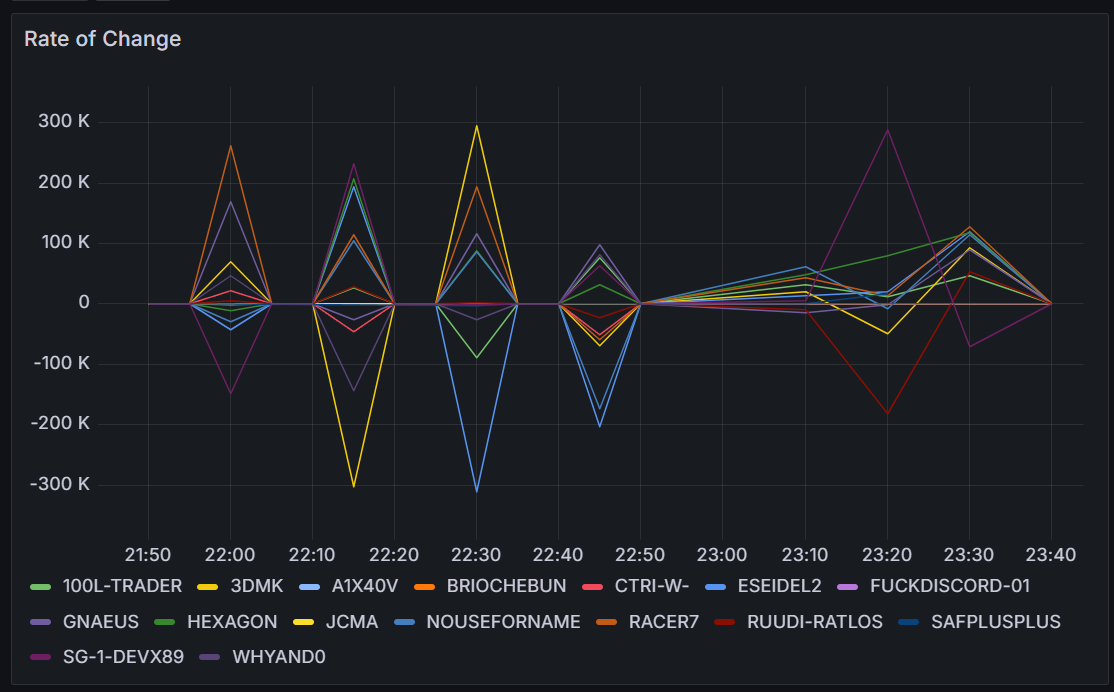
- I increased the leaderboard polling to 10 minutes, this resolves an issue where the rate of change had zero delta every second poll:
-
v2.1 - grafana dashboarding
With close to 24 hours of leaderboard data I can improve my Grafana dashboard.
By default the tags in an influxdb query like
SELECT "credits" FROM "most-credits" WHERE $timeFilter GROUP BY "agent"::tagresults in the legend displaying the tag names like this:most-credits.credits { agent: 100L-TRADER }. This redundant information can be removed in the dashboard by going to Edit Panel > Transform data and adding a Rename fields by regex transformation. I used.*agent: (.*) }as the regex.I wanted a visualisation that would display the rate of change of credits over time, and influxdb’s
DERIVATIVEfunction can perform this.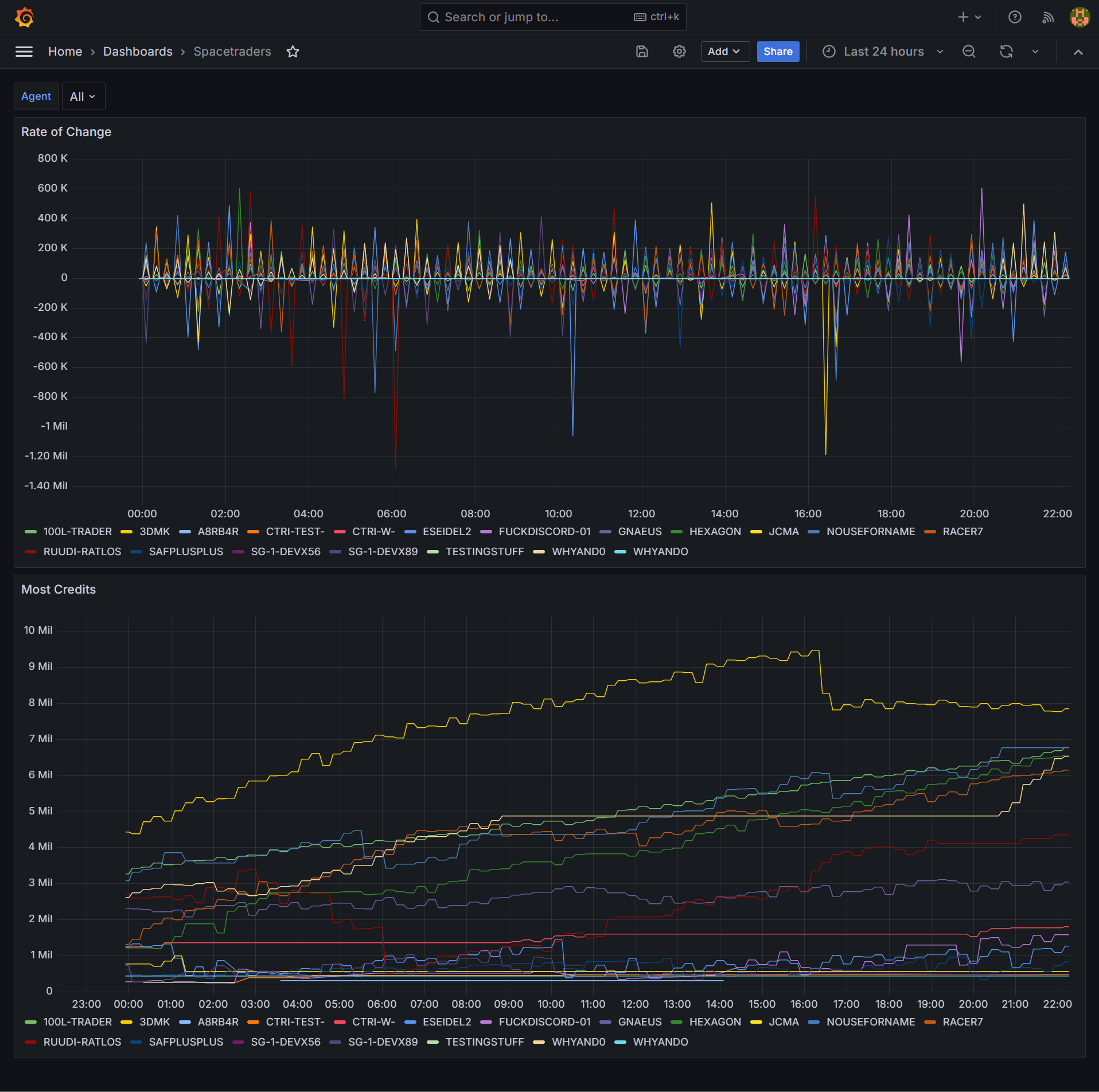
Finally, adding a Dashboard variable allows filtering all panels in the dashboard by the selected variable. Under Dashboard settings > Variables I added a variable
agentwith the queryshow tag values from "most-credits" with key="agent". Each panel’s query then can be updated to include aWHERE ("agent"::tag =~ /^$agent$/)clause.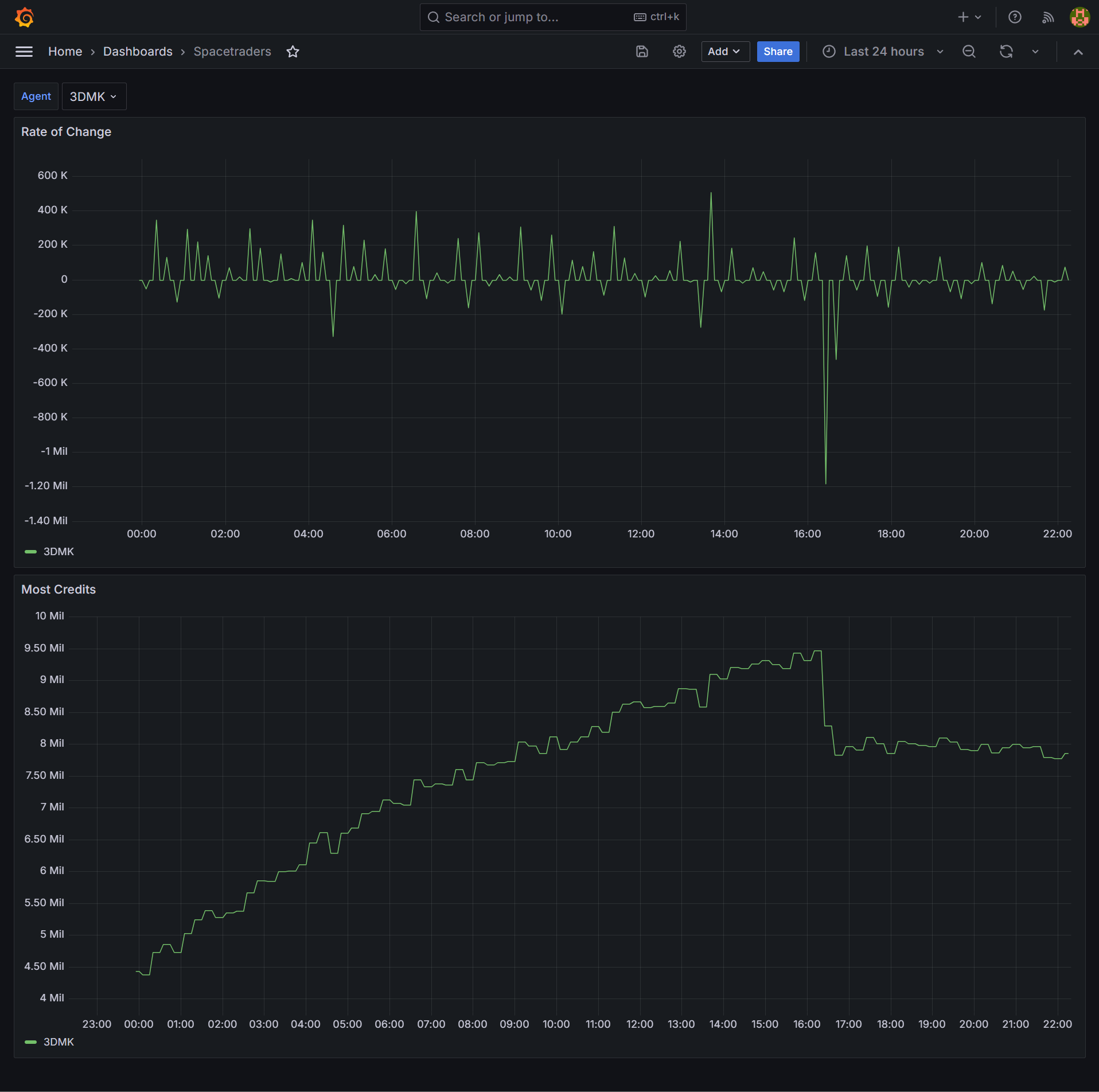
-
v2.0 - spacetraders again
Three years after my first attempt at building against the SpaceTraders API I’ve returned for another go, starting from the ground up. Where the last one was browser-based and mostly UI, for this approach I’ll be focussing on automation that is mostly server-based.
The stack so far is a node/typescript commander application with bullmq for job queueing, influxdb for time series persistence and grafana for visualisation. A winston and seq combo will handle logging concerns. redis is in there too, but only because bullmq needs it. All of this is shipped via containers so I can pull the result into my ubuntu server where it’ll run 24/7.
I’m calling a single SpaceTraders API endpoint so far and persisting the leaderboard to the timeseries database.
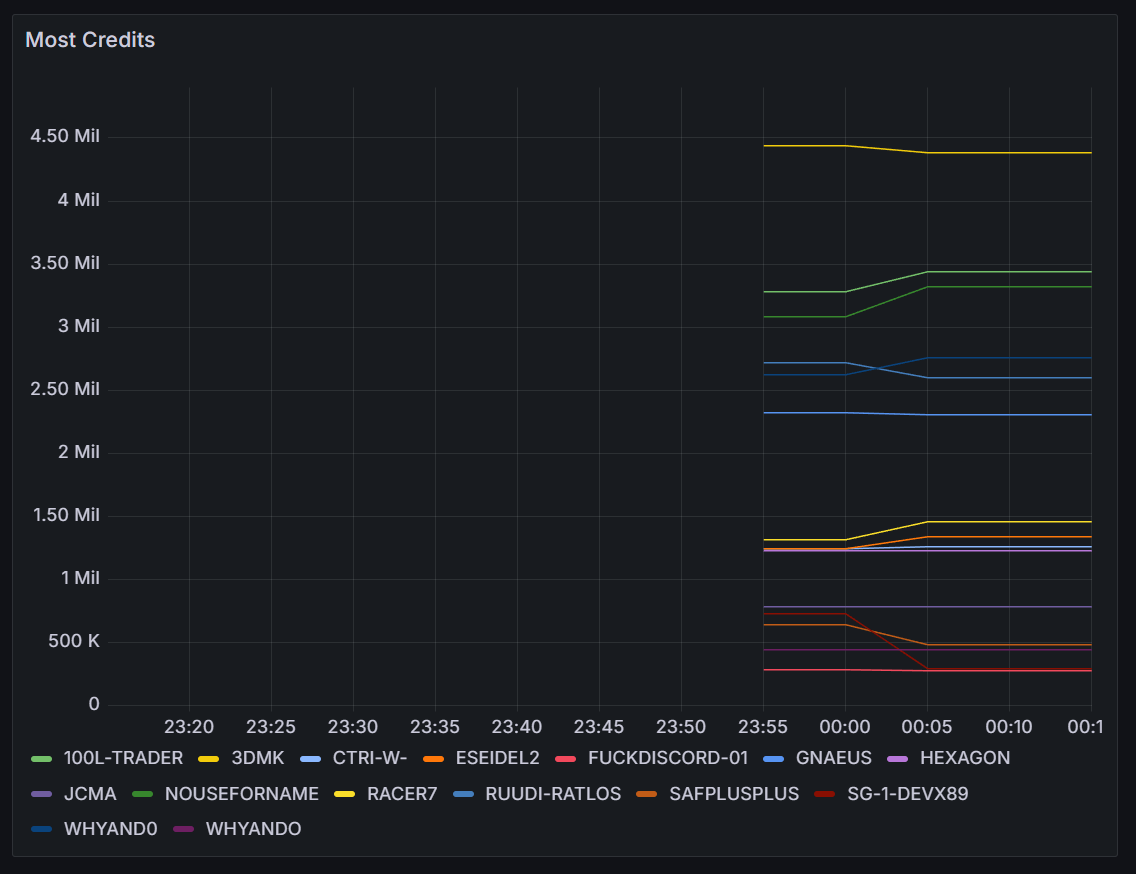
Similar to the last one, this one is also open source, and I blogged about getting started here.